

How to Learn React in 3 Months: A Realistic Study Plan for 2026
25 June 2026
281 views
This article is up to date as of October 2026

Written by
Olivia Cook,
React Ecosystem Specialist

Reviewed by
Lena Morrison,
Lead React Engineer
React has dominated frontend development for over a decade, and in 2026, it's still the most in-demand UI library on the job market. But for many aspiring developers, the learning path feels scattered: endless YouTube tutorials, conflicting advice on Reddit, and a nagging sense that you're always one concept behind. This guide cuts through the noise.
What makes this plan different is that it's built around how developers actually learn - not how courses want to sell you content. Instead of passively watching videos for weeks, you'll write code from day one. Instead of trying to memorize every API, you'll build real projects that force concepts to stick. The roadmap is structured around three progressive phases: foundation, intermediate skills, and real-world application. Each phase builds directly on the last, so nothing you learn feels wasted. By the end of Month 3, you won't just know React. You'll have a portfolio, practical experience with real tools, and the confidence to apply for junior frontend roles.
What Should You Know Before Learning React?
React is not a beginner's first step into programming - it's a tool built on top of JavaScript, and jumping into it without solid fundamentals is one of the most common reasons people stall out after a few weeks. Before you write a single line of JSX, you need a working command of the technologies below. Think of these as your launch conditions. If you're missing one or two, take two to four weeks to fill those gaps first. It will save you months of frustration later.
- HTML & CSS. You don't need to be a CSS wizard, but you must understand how the web is structured before you can build interfaces on top of it. Specifically, you should be comfortable writing semantic HTML - using the right tags for the right purposes, understanding document structure, forms, inputs, and links. On the CSS side, you need a solid grasp of the box model, flexbox, and CSS grid, since React components are ultimately just HTML elements styled with CSS.
- JavaScript (ES6+). This is the most critical prerequisite by far. React is written in JavaScript, and its modern syntax relies heavily on ES6+ features that many beginners skip over. You must be confident with arrow functions, destructuring (both object and array), the spread operator, template literals, and the ternary operator. More importantly, you need to deeply understand how Array.map(), Array.filter(), and Array.reduce() work, because these methods appear constantly in React components when rendering lists and transforming data. Understanding let vs const, block scoping, and closures is also essential.
- Asynchronous JavaScript (Promises & async/await). Modern React applications talk to APIs. They fetch data, wait for responses, and handle errors - all asynchronously. If you don't understand how Promises work, or how async/await makes asynchronous code readable, you will hit a hard wall the moment you try to integrate any real data into your components. You need to understand the event loop at a conceptual level, know how to write fetch() calls, and handle both successful responses and errors gracefully.
- Basic Command Line & Git. You don't need to be a DevOps engineer, but you must be comfortable navigating your file system in the terminal, running npm commands, and understanding what npm install actually does. More importantly, you need Git from day one. Every project you build during this three-month plan should live in a GitHub repository. This isn't optional - it's how you demonstrate your work to future employers, and it builds habits that matter in every professional development environment. Learn the core Git workflow: init, add, commit, push, pull, and branch basics.
- Basic understanding of how the browser works. This one is often overlooked, but it pays dividends once you start debugging React applications. You should know what the DOM is - the tree-like structure browsers use to represent HTML - and understand that React's key innovation is a "virtual DOM" that minimizes how often the real DOM gets updated. You should also know how browsers load JavaScript files, what the browser console is used for, and how to use basic DevTools features like inspecting elements and viewing network requests.
React Learning Roadmap: What You Need to Master?
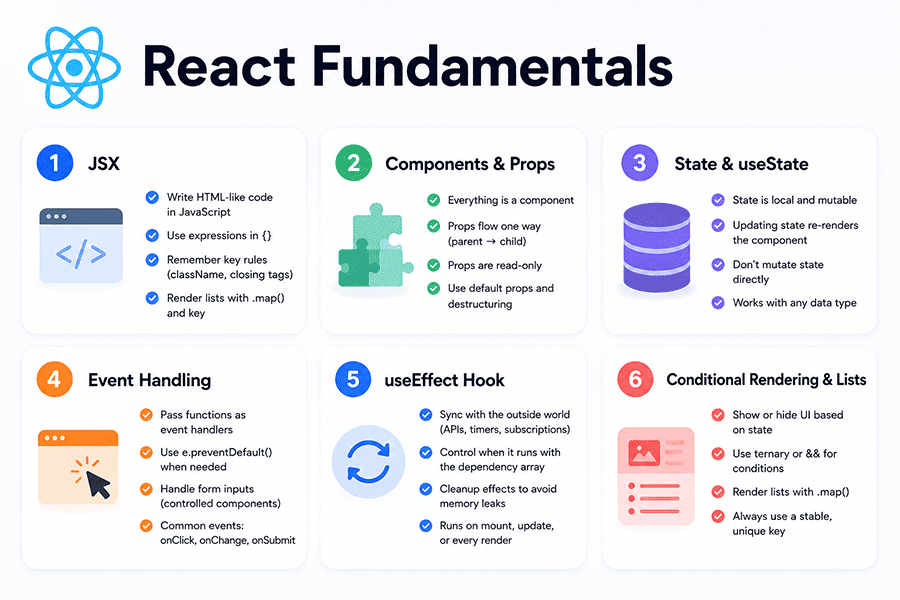
Before diving into the month-by-month schedule, it helps to see the full landscape of what React mastery actually looks like. Many learners make the mistake of treating React as a single thing to "finish" - when in reality, it's a layered skill set that expands as you go deeper. The roadmap below is organized into three tiers: fundamentals that every React developer must know cold, intermediate skills that separate beginners from job-ready developers, and advanced concepts that will set you apart in technical interviews and real-world projects. You don't need to master everything before applying for jobs - but you should be solid on Tiers 1 and 2, with at least exposure to Tier 3. Use this roadmap as your north star throughout the three months, not as a checklist to rush through.
React Fundamentals
JSX
JSX is the syntax extension that lets you write HTML-like code inside JavaScript. It looks familiar at first glance, but it has important rules: every element must have a closing tag, class attributes are written as className, and JavaScript expressions inside JSX are wrapped in curly braces. Understanding JSX deeply means knowing that it compiles down to React.createElement() calls - which is why returning multiple elements requires a wrapper (or a Fragment). You should be comfortable writing JSX expressions, conditionally rendering elements using ternary operators or logical &&, and rendering lists using .map() with proper key props.
Components and Props
In React, everything is a component - a reusable, self-contained piece of UI. Understanding how to create functional components, pass data into them via props, and compose them together into larger interfaces is the foundational mental model of React development. You need to understand that props flow in one direction (parent to child), that they are read-only inside the receiving component, and how to use default props and prop destructuring to write cleaner code. Practice by taking a static HTML page and breaking it into a component tree: a Header component, a Card component, a Footer component.
State and useState
State is what makes React components dynamic. The useState hook lets you declare a piece of data that, when changed, causes the component to re-render and show updated UI. You need to understand the difference between state and props - state is local and mutable, props are external and read-only. You should be comfortable initializing state with different data types (strings, numbers, booleans, arrays, objects), updating state correctly (especially when the new state depends on the previous value), and understanding why you should never mutate state directly. Start by building small interactive components: a counter, a toggle button, a form with controlled inputs.
Event Handling
React's event system wraps native browser events in a cross-browser-compatible layer called Synthetic Events. You handle events in React by passing functions as props - onClick, onChange, onSubmit - directly on JSX elements. Understanding how to write event handlers correctly, how to prevent default browser behavior with e.preventDefault(), and how to pass arguments to event handlers without immediately invoking them are all skills you'll use daily. Pay particular attention to onChange on form inputs, since React forms work differently from plain HTML forms - inputs are "controlled" by state, meaning every keystroke updates state and re-renders the component.
useEffect Hook
The useEffect hook is where React meets the outside world - APIs, timers, subscriptions, and anything that involves side effects. You need to understand how the dependency array works: an empty array means the effect runs once on mount, a filled array means it re-runs when those values change, and no array means it runs after every render (which is almost never what you want). Understanding cleanup functions - returned from useEffect to cancel subscriptions or clear timers - is equally important and often neglected by beginners. Common use cases include fetching data on component mount, setting page titles, and subscribing to window resize events. Master useEffect early, because most real-world React bugs involve misunderstanding when and why effects run.
Conditional Rendering and Lists
Knowing how to show or hide UI elements based on application state, and how to render dynamic lists of data efficiently, are core skills you'll use in virtually every React component you write. For conditional rendering, you should be fluent with ternary expressions, logical && short-circuit evaluation, and when to extract conditionally-rendered blocks into separate components for readability. For lists, you need to understand why React requires a unique key prop on each list item - it's how React tracks which items changed, were added, or were removed during re-renders. A missing or incorrect key can cause subtle, hard-to-debug bugs.
Intermediate React Skills
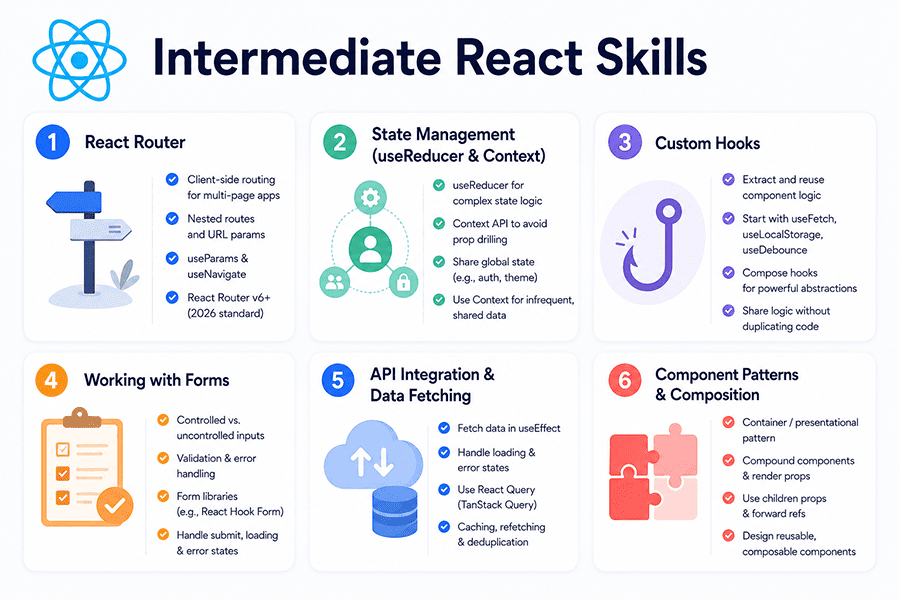
React Router
Almost every real React application has multiple pages. React Router is the standard library for handling client-side navigation - it lets you define routes, link between them without full page reloads, and pass data through URL parameters. You need to understand the difference between BrowserRouter and HashRouter, how to define nested routes, how to access URL params with useParams, and how to programmatically navigate using useNavigate. In 2026, React Router v6+ is standard, and its API is significantly different from v5 - make sure you're learning the current version.
State Management with useReducer and Context API
Once your applications grow beyond a few components, passing props through multiple layers becomes painful - a problem commonly called "prop drilling." React's built-in solutions are useReducer and Context API. useReducer is similar to useState but better suited for managing complex state logic - you dispatch actions and a reducer function determines the new state based on the action type. Context API lets you share state across your component tree without prop drilling, making it useful for things like authentication status, theme preferences, or user data. Understand when to use Context (shared, infrequently updated data) versus when to reach for a dedicated state management library.
Custom Hooks
Custom hooks are one of the most powerful features in React, and one of the clearest signals that a developer has moved beyond the beginner stage. A custom hook is simply a JavaScript function whose name starts with use and that can call other hooks internally. They let you extract reusable logic out of components - things like data fetching, form handling, local storage synchronization, or debounced input - and share that logic across your application without duplicating code. Writing your first custom hook (useFetch, useLocalStorage, useDebounce) is a moment of clarity that changes how you think about component architecture.
Working with Forms
Forms in React deserve dedicated attention because they involve multiple interconnected concepts - controlled vs. uncontrolled inputs, validation, error states, and submission handling - all at once. A controlled input is one whose value is managed by React state, giving you full control over what the user sees and what gets submitted. For simple forms, managing this manually works fine. For complex forms, a library like React Hook Form dramatically reduces boilerplate and improves performance. You need to understand both approaches. Learn how to validate inputs in real-time, display error messages conditionally, disable the submit button until the form is valid, and handle API submission with loading and error states.
API Integration and Data Fetching Patterns
In real applications, data comes from APIs, and managing that data correctly - including loading states, error states, caching, and stale data - is a significant skill. You should know how to fetch data inside useEffect, how to handle loading spinners and error messages gracefully, and why directly using fetch inside components gets complicated at scale. This is where libraries like React Query (now TanStack Query) shine - they handle caching, background refetching, and deduplication out of the box, dramatically simplifying your data layer. In 2026, using React Query for server-state management alongside Context or Zustand for client-state is a common professional pattern.
Component Patterns and Composition
As your applications grow, you need design patterns that keep your code organized, reusable, and easy to maintain. Key patterns to learn include the container/presentational pattern (separating logic from UI), the compound component pattern (building flexible, composable component APIs like a <Select> with nested <Option> children), render props, and higher-order components (though these are less common in modern React). More practically, you should deeply understand component composition - how to use children props, how to forward refs, and how to design components that are easy to use without knowing their internals.
Advanced React Concepts
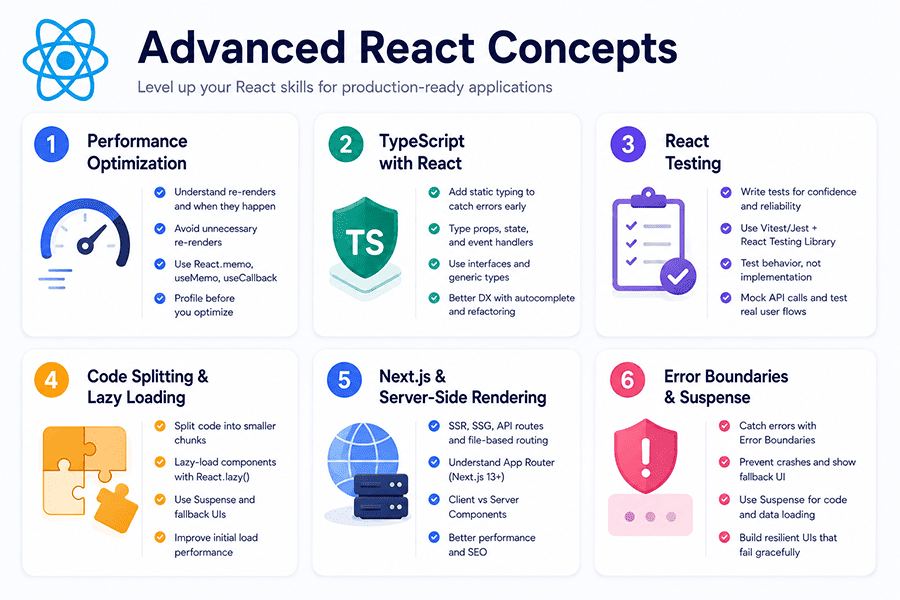
Performance Optimization
React re-renders components when state or props change, and in complex applications this can cause performance problems. You need to understand when re-renders happen, how to prevent unnecessary ones, and which tools React provides for this. React.memo wraps a component and prevents re-renders if its props haven't changed. useMemo memoizes expensive computed values. useCallback memoizes functions so they maintain referential equality between renders - important when passing callbacks to memoized child components. The key insight is that these are optimizations, not defaults - applying them everywhere adds complexity without benefit. Learn to use React DevTools Profiler to identify actual performance bottlenecks before reaching for optimization tools.
TypeScript with React
TypeScript has become the professional standard for React development. In 2026, the vast majority of new React projects - and virtually all enterprise codebases - use TypeScript. It adds static typing to JavaScript, catching type errors at compile time rather than at runtime, which dramatically reduces bugs and improves developer experience through better autocomplete and refactoring tools. For React specifically, you'll learn how to type component props with interfaces, how to type state and event handlers, and how to work with generic types in custom hooks. The learning curve is real but manageable - treat it as a layer on top of JavaScript, not a separate language.
React Testing
Professional React developers write tests. Testing is not optional in production codebases, and understanding it makes you a significantly stronger candidate in job interviews. The testing toolkit for React in 2026 centers on Vitest (or Jest) for running tests and React Testing Library for testing components. The core philosophy of React Testing Library is to test behavior rather than implementation - you test what the user sees and does, not internal component state. Learn how to write unit tests for individual components, integration tests for multi-component interactions, and how to mock API calls in tests. A component that renders a list from an API call should be tested with a mocked fetch response, verifying that the correct items appear in the DOM.
Code Splitting and Lazy Loading
As React applications grow, the JavaScript bundle sent to the browser grows with them, leading to slower initial load times. Code splitting solves this by breaking your application into smaller chunks that load on demand. React's built-in React.lazy() combined with Suspense lets you lazy-load components - meaning they're only downloaded when the user actually navigates to them. This is especially important for route-based splitting, where each page of your application loads its own JavaScript chunk rather than forcing users to download the entire app upfront. Understanding dynamic imports, the Suspense component, and loading fallback UIs is the foundational knowledge.
Next.js and Server-Side Rendering
In 2026, knowing React alone is increasingly not enough for frontend roles. Next.js is the dominant framework built on top of React, and it's expected knowledge in a large portion of job postings. It adds server-side rendering (SSR), static site generation (SSG), file-based routing, API routes, and the App Router (introduced in Next.js 13+ and now standard) to your React toolkit. Understanding the difference between client components and server components - a Next.js concept that has reshaped how React apps are structured - is essential. Server components render on the server and send HTML to the browser, reducing JavaScript bundle size and improving performance.
Error Boundaries and Suspense
Error Boundaries are React class components (one of the few remaining valid use cases for class components) that catch JavaScript errors in the component tree and display a fallback UI instead of crashing the entire application. Every production React app should have at least one Error Boundary wrapping the application root. Suspense, which you briefly encountered in the context of lazy loading, has expanded in modern React to also wrap data-fetching operations - allowing you to declaratively specify loading states at the component level. Understanding how to design resilient UIs - ones that fail gracefully rather than breaking entirely - is a mark of production experience.
Month 1: Building Your React Foundation
The first month is about establishing habits as much as learning syntax. Your primary goal is to become comfortable reading and writing React code - not to build impressive projects, but to internalize the core patterns until they feel natural. This means you'll be writing a lot of small, focused components: counters, toggles, forms, lists. Resist the urge to jump ahead to routing or state management libraries. Every hour you spend truly mastering useState, useEffect, and props in Month 1 will pay compound interest in Months 2 and 3.
Expect the first two weeks to feel slow. You'll spend time setting up your environment, getting confused by JSX, and wondering why your state updates aren't showing up (spoiler: you're mutating state directly). This is normal. The goal is consistent daily progress - even 90 minutes a day compounds significantly over 30 days. By the end of Month 1, you should be able to build a multi-component React application with interactive state and API data, without following a tutorial step by step.
| Week | Topics to Cover | Resources | Project |
| Week 1 | Environment setup (Node, Vite, VS Code), JSX syntax, creating components, props | Official React docs, Scrimba React course | Real-Time Chat Application |
| Week 2 | useState, event handling, controlled forms, conditional rendering | react.dev "Adding Interactivity" section, Kevin Powell "CSS for styling" (YouTube) | Interactive counter app, toggle dark/light mode button |
| Week 3 | useEffect basics, fetching data from a public API, loading & error states | react.dev "Escape Hatches", The Net Ninja "React tutorial" (YouTube) | Weather widget using Open Meteo API |
| Week 4 | Lists with .map() and keys, lifting state up, component composition | React docs "Managing State", Scrimba challenges | Movie search app using OMDB API (search + results list) |
Month 2: From Beginner to Intermediate React Developer
By the start of Month 2, you should be writing React components without hesitation and have a genuine feel for the data flow model. Now the work gets more challenging - and more interesting. This month is about building the skills that appear in real job descriptions: routing, state management, custom hooks, forms, and API integration patterns. You'll also start writing code that looks like professional code, not tutorial code.
The biggest mental shift in Month 2 is learning to think architecturally. Instead of "how do I make this work," you'll start asking "where should this state live?" and "how do I structure these components so the code stays maintainable?" These questions don't have one right answer, but learning to ask them is the transition from beginner to intermediate developer. Expect the React Router and Context sections to require extra time - they involve more abstract thinking than anything in Month 1.
| Week | Topics to Cover | Resources | Project |
| Week 5 | React Router v6: BrowserRouter, Route, Link, useParams, useNavigate | React Router official docs, Codevolution "React Router tutorial" (YouTube) | Multi-page blog app (home, post list, individual post pages) |
| Week 6 | useReducer, Context API, avoiding prop drilling, global state patterns | react.dev "Scaling Up with Reducer and Context", Jack Herrington "Become a Pro React Developer" (YouTube) | Shopping cart with global state (add/remove items, total price) |
| Week 7 | Custom hooks (useFetch, useLocalStorage, useDebounce), refactoring components | Josh W. Comeau blog, "Building Your Own Hooks" (react.dev) | Movie Search App |
| Week 8 | React Hook Form, form validation, multi-step forms, API submission with loading/error states | React Hook Form docs, Zod for validation, Fireship "React in 100 Seconds" (YouTube) | Registration / job application form with full validation |
Month 3: Real-World React Development
Month 3 is where everything comes together. You've got the fundamentals, you've got the intermediate skills - now you're going to build applications that look and behave like real products. This month introduces the tools and concepts that professional developers use daily: TypeScript, performance optimization, testing, and Next.js. It also includes your capstone project - the one you'll feature prominently in your portfolio and talk through in interviews.
The pace increases in Month 3, and that's intentional. You're not learning new syntax from scratch; you're layering professional tooling on top of concepts you already know. TypeScript will feel frustrating for the first few days, then click. Writing your first passing test will feel deeply satisfying. By the end of this month, you should have two or three strong portfolio projects, a GitHub profile that shows consistent activity, and the ability to talk intelligently about React's architecture, trade-offs, and ecosystem in an interview setting.
| Week | Topics to Cover | Resources | Project |
| Week 9 | Introduction to TypeScript: types, interfaces, typing props and state, typing event handlers | TypeScript official docs, Matt Pocock's "Total TypeScript" | Counter&Timer App |
| Week 10 | React Query (TanStack Query) for server state, caching, background refetch, optimistic updates | TanStack Query docs, Dominik Dorfmeister (TkDodo) blog | Dashboard app with real API data, pagination, and loading states |
| Week 11 | React Testing Library + Vitest: unit tests, integration tests, mocking API calls | Testing Library docs, Kent C. Dodds blog | Add test coverage to an existing project (aim for key user flows) |
| Week 12 | Next.js App Router: file-based routing, server vs. client components, SSR, deployment to Vercel | Next.js official docs, Next.js official course | Capstone: full-stack Next.js app (e.g., job board, recipe app, or note-taking tool with auth) |
Common Mistakes That Slow Down React Learning
Every developer who has learned React has made the same mistakes. That's not an exaggeration - the React learning path has well-worn pitfalls that consistently derail beginners, not because they're not talented, but because nobody warned them. Understanding these mistakes in advance doesn't mean you'll avoid them entirely, but it means you'll recognize them faster when they happen and know how to course-correct.
Conclusion
Three months is a short time to become a React developer, but it's absolutely enough time to become a capable one - if you show up consistently and follow a plan built around actual skill development rather than passive consumption. The learners who succeed in 90 days are not necessarily the most talented; they're the ones who wrote code every single day, built projects they cared about, and treated mistakes as information rather than evidence of failure.
React is a learnable skill - the concepts are logical, the ecosystem is well-documented, and the community is enormous. You will get stuck. You will have weeks where progress feels invisible. Push through them, because the other side of confusion is competence. By Month 3, the developer writing tests for a Next.js application and pushing code to GitHub every day will look back at Week 1's counter component and barely recognize the gap - and that gap is what employers are paying for.
Frequently Asked Questions About Learning React
Can I realistically learn React in 3 months if I already know JavaScript?
Yes - and not just "learn the basics," but reach a level where you can build real, portfolio-worthy applications and credibly apply for junior frontend positions. The key phrase is "already know JavaScript." If you have a working command of ES6+ syntax, array methods like .map() and .filter(), Promises, and async/await, then React's learning curve is primarily about understanding its component model and hooks - not about fighting the underlying language. With one to two hours of focused daily practice following a structured plan, three months gives you roughly 90 to 120 hours of learning time.
That's enough to cover React fundamentals, intermediate skills like routing and state management, professional tools like TypeScript and React Query, and time to build three to five projects. What it requires is consistency over intensity - 90 minutes every day beats six hours on weekends. It also requires active learning: building projects, writing tests, debugging real errors. Learners who follow this model consistently report feeling job-ready after 10 to 14 weeks.
How many hours per day should I spend learning React to complete the plan in 3 months?
The honest answer: one to two hours on weekdays, with three to four hours on at least one weekend day. That cadence puts you at roughly eight to twelve hours per week, or 100 to 140 hours over three months - which aligns with what the structured plan in this article requires. More important than the total number of hours is the quality of those hours. An hour of focused, distraction-free coding - building a project, debugging a specific issue, writing a custom hook from scratch - is worth more than three hours of half-attentive tutorial watching. If your schedule allows more time, use it for additional projects rather than accelerating through the curriculum.
More projects mean more problem-solving experience, and that experience is what interviews actually test. If your schedule is constrained and you can only do one hour a day, the plan is still achievable - it may stretch to four months rather than three, but the structure remains valid. Don't abandon the plan because the timeline slips slightly; consistent progress at any pace beats a perfect schedule abandoned in Week 4.
Is React still worth learning in 2026, or should I focus on a newer framework?
React is absolutely worth learning in 2026 - arguably more so than ever, because its ecosystem has matured and its market dominance has only grown. As of 2026, React powers more production applications than any other frontend framework, and Next.js (built on React) is the default choice for new web projects across startups and enterprises alike. The frontend landscape does evolve - Svelte, Solid, Qwik, and Astro each have genuine technical merit - but none of them approach React's share of job postings, community resources, or available open-source tooling.
More practically, the concepts you learn in React - component-based architecture, unidirectional data flow, declarative rendering, hooks - transfer directly to every other modern framework. React is not going away; it's going deeper, with React Server Components reshaping how full-stack React applications are built. If your goal is employability in 2026, React (with Next.js) is the highest-ROI skill in the frontend ecosystem.
How many React projects should I build before applying for jobs as a junior developer?
Quality over quantity - but you need both. The minimum bar for a credible junior React portfolio in 2026 is three to five projects, with at least two that are meaningfully complex. "Meaningfully complex" means the project connects to a real API, has multiple pages with routing, handles loading and error states properly, and ideally includes user authentication or a database. A to-do app and a weather widget are fine for Week 2 practice, but they should not be your portfolio's centerpiece. What employers actually want to see: one or two projects that demonstrate you can solve a real problem, are structured with clean, readable code, have a README explaining what the project does and how to run it, and are deployed (Vercel or Netlify) so they can be opened in a browser without setup.
Beyond the code itself, the conversation around your projects matters enormously in interviews. You should be able to explain every architectural decision you made, what you would improve with more time, and what you learned by building it. That conversational depth signals genuine understanding more than any line count or feature list.
Should I learn TypeScript at the same time as React, or focus on React first?
Learn React first, then add TypeScript - but don't wait too long. The reason to separate them initially is cognitive load: React and TypeScript each have significant learning curves, and learning both simultaneously, especially in Month 1, creates confusion about which layer is causing a given problem. Is this a React error or a TypeScript error? When you don't know either language well, that distinction becomes extremely difficult to make. Spend Month 1 and most of Month 2 building your React intuition in plain JavaScript. By Month 3, once you can build a React app without consulting documentation for basic patterns, you're ready to add TypeScript.
At that point, the types feel additive rather than obstructive - you already know what a component's props are supposed to be, and TypeScript is just making that knowledge explicit. The one exception to this sequencing: if you're already a TypeScript user coming from another framework or a backend role, start with TypeScript from Week 1. The setup cost is low, and you'll benefit from type safety throughout your learning journey.
Others Also Read