

TypeScript vs JavaScript in 2026: Should You Make the Switch?
09 July 2026
295 views
This article is up to date as of October 2026

Written by
Michael Reynolds,
Senior JavaScript Developer

Reviewed by
Maya Desai,
Senior JavaScript Engineer
If you're learning to code in 2026, the TypeScript vs JavaScript question comes up fast. It's one of the most searched topics among new developers - and for good reason. These two languages dominate frontend development, they're closely related, and the choice you make early on has real consequences for how quickly you get hired and how much you earn. Most bootcamps still start with JavaScript. Most job postings now ask for TypeScript. That gap is worth paying attention to.
JavaScript has been the language of the web for nearly three decades. It runs in every browser, powers millions of apps, and has one of the largest developer communities on the planet. It's flexible, approachable, and fast to get started with - which is exactly why it became the default first language for frontend developers. But that flexibility has a cost. Large JavaScript codebases become hard to maintain, bugs hide in plain sight, and onboarding new developers onto an existing project takes longer than it should.
TypeScript was Microsoft's answer to that problem. Released in 2012, it adds a static type system on top of JavaScript without replacing it. You still write JavaScript - you just write it with more guardrails. Today, TypeScript is used by Google, Airbnb, Slack, and most teams building anything at scale. In 2026, knowing TypeScript isn't a bonus on your resume. For many roles, it's a baseline requirement.
What Is TypeScript vs JavaScript? Understanding the Fundamentals
By 2026, the gap in adoption has widened significantly. TypeScript now accounts for the majority of new frontend projects at mid-size and enterprise companies. The Angular framework is written in TS by default, React and Vue both have first-class support, and tools like Next.js are increasingly TypeScript-first. Understanding the distinction between the two also clears up a common misconception: TypeScript does not replace JavaScript. It compiles down to JS before execution. Everything TS can do, JS eventually runs. The difference is in the development experience, the tooling, and the confidence you have that your code does what you think it does.
TypeScript vs JavaScript Differences Explained
The most important difference between TypeScript and JavaScript is when errors are caught. In JavaScript, you find out something went wrong when the code runs - sometimes in a browser, sometimes in a user's session. In TypeScript, a large category of errors is caught by the compiler before any code executes. That shift from runtime to compile-time error detection is the core reason enterprises choose TS for serious projects.
Beyond type safety, the two languages differ in tooling quality. TypeScript enables more accurate autocomplete, better refactoring support, and inline documentation in editors like VS Code. When you rename a function in a TypeScript project, your editor knows every place it's used and updates them all. In a plain JavaScript project, that same operation requires more manual verification, grep searches, or just hoping nothing broke.
| Aspect | TypeScript | JavaScript | Verdict |
| Typing | Static (checked at compile time) | Dynamic (checked at runtime) | TS catches more bugs earlier |
| Learning curve | Steeper - requires understanding types, interfaces, generics | Gentler - write code and see results immediately | JS is easier to start with |
| Tooling & IDE support | Excellent - precise autocomplete, refactoring, inline docs | Good, but less accurate without type info | TS wins for larger projects |
| Runtime performance | Identical - compiles to JavaScript | Native execution in browser/Node.js | No difference at runtime |
| Build step | Required - tsc or bundler compiles TS → JS | Optional - can run directly in browser | JS is simpler to deploy |
| Community & ecosystem | Large and growing; most major libraries include type definitions | Largest ecosystem overall | JS still leads in raw package volume |
| Maintenance at scale | Significantly easier - types serve as live documentation | Harder - relies on naming conventions and comments | TS has a clear advantage on big codebases |
| Job market demand (2026) | Required for most mid-level and senior roles | Still needed as a foundation | Both matter; TS increasingly expected |
TypeScript vs JavaScript Advantages for Modern Development
The practical advantages of TypeScript go beyond catching typos. In a real codebase, static types act as documentation that stays accurate - unlike comments, which go stale. When a new developer joins a team and reads a TypeScript function signature, they know exactly what goes in and what comes out without reading the full implementation. TS also makes large-scale refactoring dramatically safer: change an interface, and the compiler immediately surfaces every file that needs to be updated. For teams using React, TypeScript makes component props explicit, which reduces the guesswork that slows down code reviews and debugging. Frameworks like Next.js, NestJS, and Angular are all TypeScript-first in 2026, meaning you'll work with TS whether you explicitly choose it or not if you're building in those ecosystems.
When to Use TypeScript vs JavaScript
| Scenario | Recommended Language | Reason |
| Learning your first programming concepts | JavaScript | Fewer abstractions, faster feedback loop |
| Building a small personal project or prototype | JavaScript | Less setup, faster to ship |
| Working on a team with 3+ developers | TypeScript | Shared types reduce miscommunication |
| Building a production app that will grow over time | TypeScript | Long-term maintainability pays off |
| Contributing to open source libraries | TypeScript | Type definitions improve DX for all users |
| Quick scripting or automation tasks | JavaScript | Overhead of types isn't worth it for short scripts |
| Applying for mid-level to senior frontend roles | TypeScript | Most companies expect it at that level |
| React / Next.js / Angular development | TypeScript | Frameworks are TypeScript-first; fighting it costs time |
TypeScript vs JavaScript Comparison: Which One Performs Better?
Performance is one of the most misunderstood topics in the TypeScript vs JavaScript debate. Developers new to TypeScript often worry that adding a type system means adding overhead - slower execution, heavier bundles, lagging applications. That concern is understandable but largely misplaced. The two languages don't actually compete at runtime because by the time your code runs in a browser or Node.js environment, TypeScript no longer exists. It has already been compiled away.
What does differ between the two is the development-time experience and build pipeline. TypeScript introduces a compilation step that JavaScript doesn't require. On large projects, that step takes time. Teams working with hundreds of TypeScript files will notice longer initial build times compared to equivalent JavaScript projects. That's a real tradeoff, and it's worth knowing about before you adopt TypeScript for a time-sensitive prototype or a solo weekend project.
Where TypeScript genuinely pulls ahead is in the quality of code it encourages. Better-typed code tends to be more predictable, which means fewer runtime surprises, fewer null reference errors, and fewer edge cases that only surface under production load. Indirectly, TypeScript pushes developers toward writing code that performs better - not because the language itself is faster, but because the discipline of types reduces the kind of sloppy logic that causes performance issues in the first place.
TypeScript vs JavaScript: Which Is Faster?
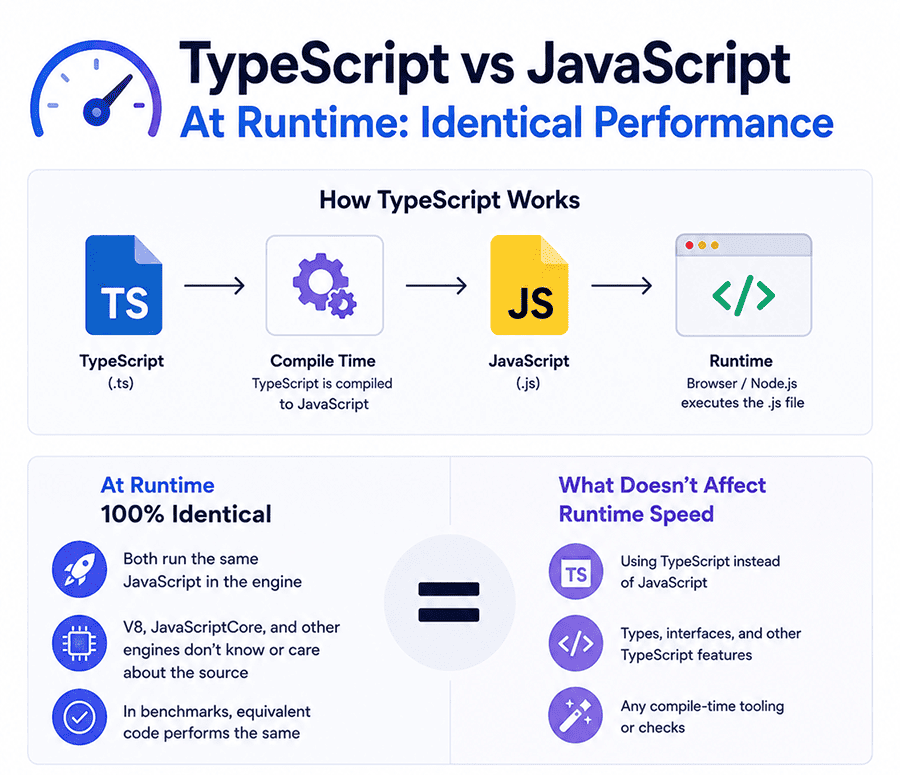
At runtime, TypeScript and JavaScript perform identically. This isn't a close comparison or a matter of benchmarks - it's a structural fact. TypeScript compiles to plain JavaScript before any code executes. The browser or Node.js runtime never sees a .ts file. It only ever runs the compiled .js output, which is indistinguishable from JavaScript written by hand. So if someone tells you "TypeScript is slower than JavaScript," they're conflating two different things: compile-time speed and runtime speed. Compile time is how long it takes to turn your TypeScript source into JavaScript. Runtime speed is how fast that JavaScript actually executes. These are separate concerns, and only one of them - runtime speed - affects your users.
In benchmarks comparing equivalent logic written in TypeScript and JavaScript, the output JavaScript is byte-for-byte the same in most cases. The V8 engine in Chrome and the JavaScriptCore engine in Safari don't know or care whether the source was typed. They optimize based on the JavaScript they receive, not its origin. Where execution speed actually differs between projects has nothing to do with TypeScript. It comes down to algorithmic choices, DOM manipulation frequency, network calls, and how efficiently state is managed - factors that apply equally to both languages. Choosing TypeScript over JavaScript won't slow your app down. Writing inefficient logic in either language will.
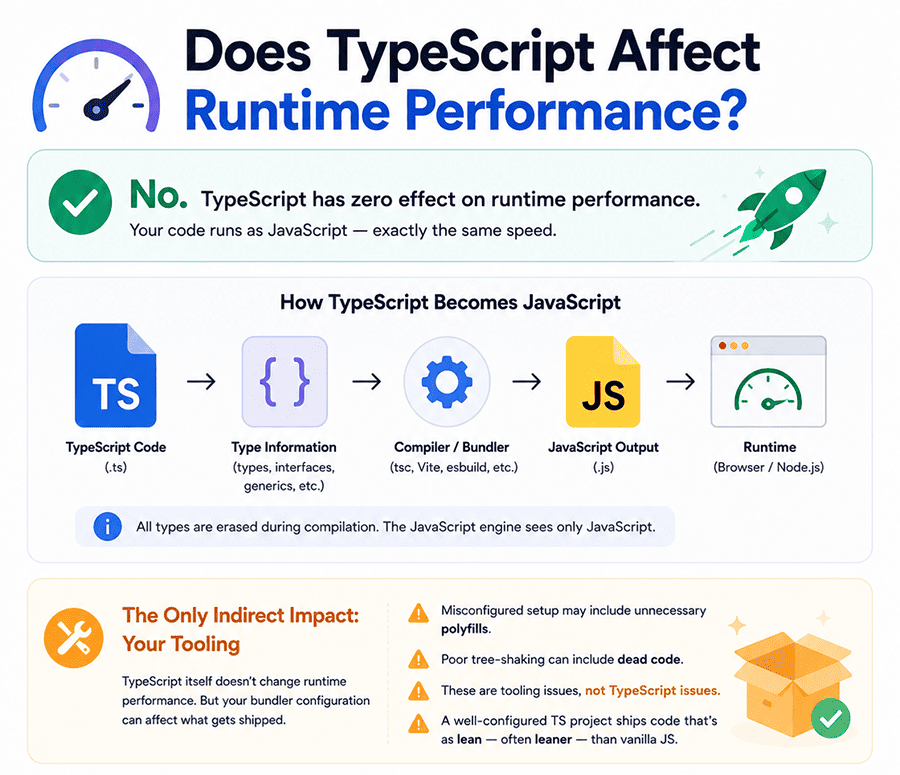
Does TypeScript Affect Runtime Performance?
TypeScript has zero effect on runtime performance. Once the TypeScript compiler (tsc) or a bundler like Vite or esbuild processes your code, all type annotations, interfaces, and generics are stripped out entirely. They leave no trace in the output. The resulting JavaScript is what runs - and it runs at the same speed as any other JavaScript.
This is worth stating plainly because it surprises a lot of developers coming from languages like Java or C#, where type information can influence how code is compiled and optimized at a lower level. TS doesn't work that way. It targets JavaScript as its output, and JavaScript is dynamically typed at the engine level regardless of what you wrote in your source file.
There is one indirect way TypeScript can affect what gets shipped to the browser: bundler configuration. If your TS setup is misconfigured, you might end up shipping polyfills you don't need, or failing to tree-shake dead code properly. But that's a tooling issue, not a TypeScript issue. A well-configured TypeScript project with a modern bundler will produce output that's just as lean - often leaner - than a JavaScript project where type-driven dead code elimination is harder to verify.
If your TypeScript app feels slow, the fix is not to switch to JavaScript. The fix is to profile your runtime behavior, optimize your data fetching, and review your rendering logic.
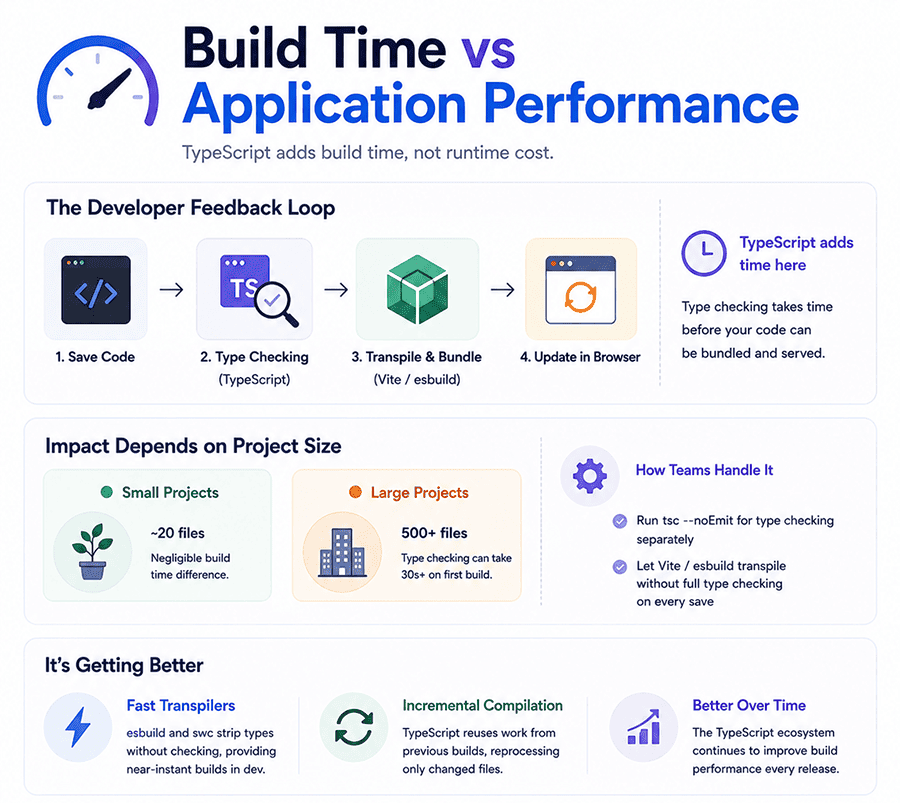
Build Time vs Application Performance
There's a legitimate performance conversation to have around TypeScript, and it's about build time - the time between saving your code and seeing the result. Plain JavaScript, especially when served directly through a dev server like Vite, can update in the browser almost instantly. TypeScript adds a type-checking step that takes time, and on large projects, that step can slow your feedback loop in a way that genuinely affects productivity.
The severity depends on project size. A small app with 20 files will see negligible build time differences. A monorepo with 500 TypeScript files and complex generics can have type-checking runs that take 30 seconds or more on first build. Teams at that scale often address this by running tsc --noEmit for type checking separately from the actual bundling step, letting Vite or esbuild handle transpilation without full type verification on every save.
It's also worth understanding that this problem has gotten better, not worse. Tools like esbuild and swc transpile TypeScript by stripping types without checking them, producing near-instant output for development. The TypeScript team has invested heavily in incremental compilation, which reuses work from previous builds so only changed files get reprocessed. Application performance - how fast your shipped product runs for real users - is entirely unaffected by the TypeScript build pipeline. That distinction matters when you're evaluating whether TypeScript is right for your project.
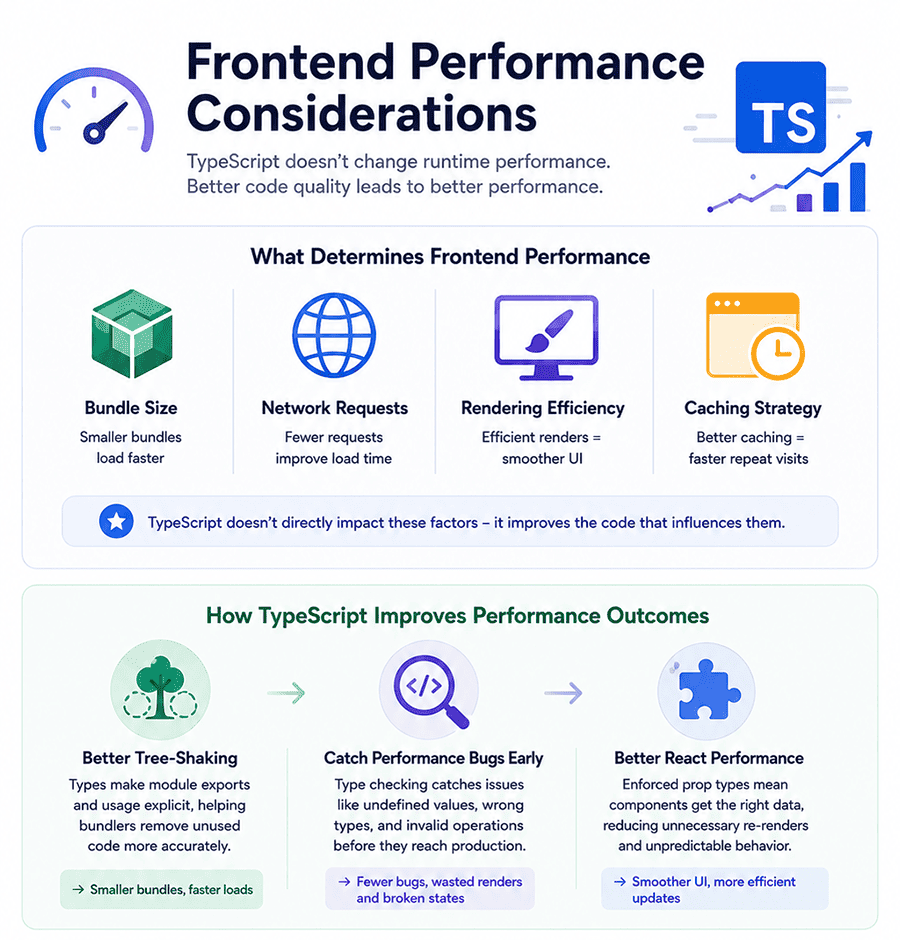
Frontend Performance Considerations
Frontend performance is determined by a handful of well-documented factors: bundle size, number of network requests, rendering efficiency, and how aggressively assets are cached. TypeScript doesn't move the needle on any of these directly. What it does affect is the quality of the code producing those outcomes.
In practice, TypeScript-typed codebases tend to work better with tree-shaking - the process by which bundlers remove unused code from the final bundle. When types make it explicit which exports a module provides and which ones are actually used, bundlers like Rollup and Webpack can make more accurate decisions about what to include. The result is smaller bundles, which directly improves load time.
TS also makes it easier to catch certain categories of performance bugs before they reach production. A function that accidentally receives undefined instead of a number and runs a calculation on it won't throw an obvious error in JavaScript - it'll produce NaN and potentially trigger unnecessary re-renders or broken UI states. TypeScript catches that mismatch at compile time.
For React developers specifically, TypeScript enforces correct prop types, which reduces the chance of components receiving unexpected data and re-rendering more often than they should. None of this is magic - you still need to write efficient React code - but the type system removes one entire category of subtle bugs that affect both correctness and performance. Over the lifetime of a production application, that adds up.
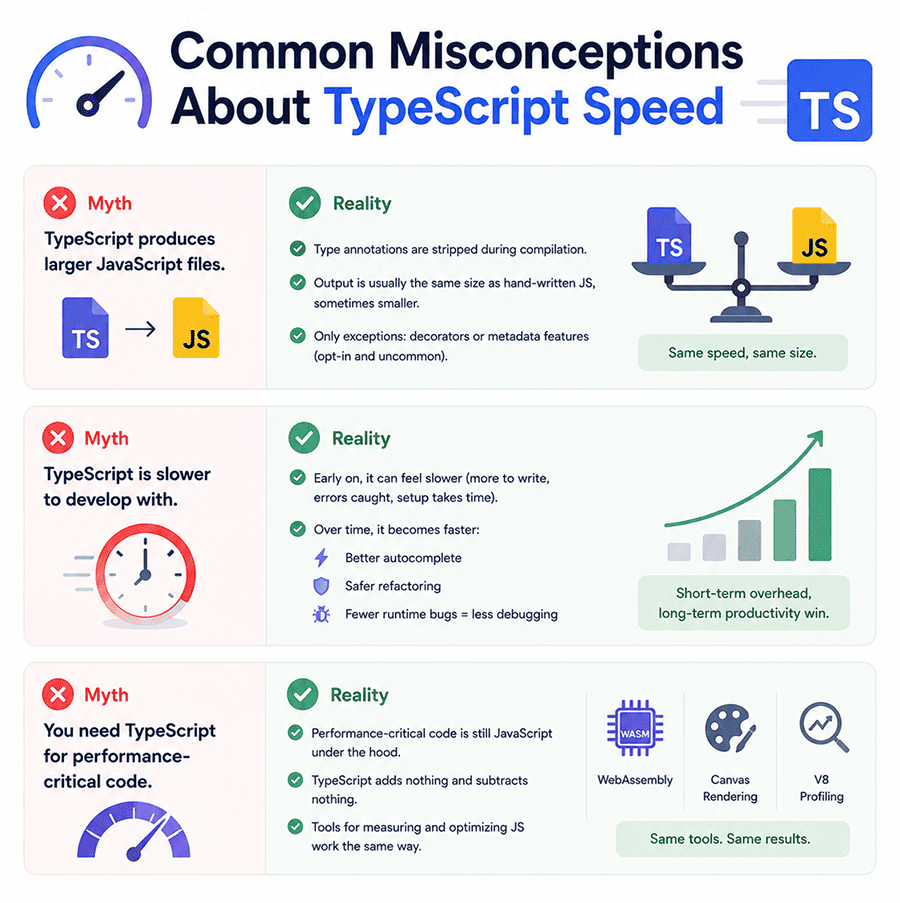
Common Misconceptions About TypeScript Speed
The most common misconception is straightforward: "TypeScript is slower than JavaScript." As covered above, this isn't true at runtime. But there are a few more nuanced myths worth addressing, especially if you're making a decision about which language to learn or use on your next project.
Myth: TypeScript produces larger JavaScript files. In most cases, it doesn't. Type annotations are stripped during compilation, not transpiled into additional code. The output is typically the same size as hand-written JavaScript, sometimes smaller if the compiler optimizes certain patterns. The exception is when TypeScript emits decorators or certain metadata features, but those are opt-in and uncommon in standard frontend development.
Myth: TypeScript is slower to develop with. Early in a project, this can feel true - you're writing more, the compiler catches errors you'd prefer to fix later, and setting up configuration takes time. But on projects lasting more than a few weeks, the opposite tends to hold. Autocomplete is faster, refactoring is safer, and debugging takes less time because many bugs were already caught before you ran the code.
Myth: You need TypeScript for performance-critical code. Performance-critical JS is still JS under the hood. If you're writing WebAssembly, optimizing canvas rendering, or profiling V8 behavior, TypeScript adds nothing and subtracts nothing from that process. The tools for measuring and improving JavaScript runtime performance work the same way regardless of whether your source was typed.
TypeScript vs JavaScript in the Job Market (2026)
The frontend job market in 2026 looks different from what it did even three years ago. TypeScript has moved from "nice to have" to a standard expectation at most companies hiring frontend developers. A quick scan of job postings on LinkedIn or Indeed for React developer roles reveals that the majority of mid-level and senior positions now list TypeScript as a required skill, not an optional one. Companies that built their frontend in JavaScript five years ago have largely migrated or are actively migrating. New projects almost universally start in TypeScript. If you're entering the job market now, learning TypeScript isn't a way to stand out - it's the baseline you need to clear.
That said, JavaScript isn't going anywhere. Every TypeScript developer is, by definition, a JavaScript developer. Interviewers at technical companies still test JavaScript fundamentals: closures, the event loop, prototypal inheritance, async/await behavior. Knowing TypeScript syntax without understanding the JS underneath it is a gap that shows up fast in technical interviews. The developers getting hired at the best companies in 2026 are fluent in both - they understand JavaScript deeply and use TS as the layer on top that makes their work more reliable and maintainable. Treating the two as competitors misses the point. They're sequential, not parallel.
Freelance and contract markets tell a slightly different story. Smaller clients, agencies working on tight budgets, and solo founders building MVPs often still work in plain JavaScript. The overhead of TypeScript configuration isn't always worth it for a two-week project. So if you're planning a freelance career alongside or instead of full-time employment, solid JavaScript skills remain directly marketable. But for anyone targeting a full-time role at a product company - startup, mid-size, or enterprise - TypeScript proficiency is the expectation you need to meet.
Job Demand Comparison Table
| Factor | JavaScript | TypeScript |
| Overall Demand | Very high; widely used across all web projects | Rapidly growing; strong demand in modern applications |
| Popularity in Job Listings | Present in almost every frontend and many backend roles | Increasingly listed as a requirement or strong plus |
| Entry-Level Opportunities | More beginner-friendly roles available | Fewer junior roles, often expected alongside JavaScript |
| Usage in Large Projects | Common, but may lack structure in scaling | Preferred for large-scale and enterprise applications |
| Framework Support | Core language for React, Vue, Angular | Strong support; default choice in Angular, widely used with React |
| Backend Demand (Node.js) | High demand in startups and small teams | Growing demand in scalable backend systems |
| Salary Trends | Competitive, but average | Often higher due to specialization and complexity |
| Learning Curve (for Jobs) | Easier to start applying quickly | Requires deeper understanding, but valued by employers |
| Company Preference | Startups and small companies | Enterprises, tech companies, and long-term projects |
Salary Comparison: Does TypeScript Increase Your Earning Potential?
The short answer is yes - but not in the way most people expect. TypeScript doesn't directly inflate your salary the way a specific certification or framework might. What it does is qualify you for a broader range of roles, including the ones that pay more. Senior frontend positions, staff engineer roles, and lead developer jobs at product companies almost universally require TypeScript. If you only know JavaScript, you're competing for a narrower slice of the market. If you know TypeScript well, the ceiling on what you can apply for rises considerably.
Compensation data from sources like the Stack Overflow Developer Survey and Levels.fyi consistently shows that developers who work primarily in TypeScript report higher median salaries than those working in plain JavaScript. Part of that gap reflects the types of companies and projects where TypeScript is used - larger teams, more complex products, higher engineering standards overall. A developer at a Series B startup building a TypeScript-first product is likely earning more than a developer maintaining a legacy JavaScript codebase at a small agency, and TypeScript proficiency is one of several factors that got them there.
For developers early in their careers, the practical implication is clear. Learning TypeScript as soon as you have a solid JavaScript foundation - not instead of it, but on top of it - expands your job options and moves you faster toward roles with stronger compensation. The investment is measured in weeks of learning, not months. The return shows up in which job postings you can credibly apply to, how you perform in technical interviews, and how quickly you can take on higher-responsibility work once hired.
Salary Comparison Table
| Position Level | JavaScript (Avg Annual Salary) | TypeScript (Avg Annual Salary) |
| Junior Developer | $50,000-$75,000 | $60,000-$85,000 |
| Mid-Level Developer | $75,000-$110,000 | $90,000-$120,000 |
| Senior Developer | $110,000-$150,000+ | $120,000-$160,000+ |
| Frontend Developer | $80,000-$120,000 | $95,000-$130,000 |
| Full-Stack Developer | $90,000-$130,000 | $100,000-$140,000 |
| Tech Lead / Architect | $130,000-$180,000+ | $140,000-$190,000+ |
Note:
- TypeScript roles often offer higher salaries due to demand in scalable and enterprise applications.
- Salaries vary significantly depending on location (e.g., US vs Europe vs Middle East), company size, and experience.
Final Verdict: Which Should You Learn First?
Start with JavaScript. Not because TypeScript is too hard, but because TypeScript makes more sense once you understand what it's fixing. The type system, the compiler errors, the interfaces and generics - they all become intuitive when you already know the JavaScript behavior they're guarding against. Trying to learn both simultaneously from zero usually means learning neither well. Spend your first two to three months building real things in JavaScript: DOM manipulation, fetch requests, async logic, array methods. Once that clicks, TypeScript will feel like a natural upgrade rather than a foreign language. The switch typically takes a few weeks of focused practice, and most developers report that once they've worked in TypeScript for a month, going back to plain JavaScript feels uncomfortable. That discomfort is a good sign - it means the type system is doing its job.
Everything You Actually Wanted to Know About TS vs JS
What is TypeScript vs JavaScript and why do so many companies prefer TypeScript in 2026?
JavaScript is the original language of the web - it runs natively in every browser and has been the foundation of frontend development since the mid-1990s. TS is a superset of JS developed by Microsoft that adds static typing to the language. In practical terms, this means you declare what type of data a variable or function parameter should hold, and the TypeScript compiler checks those declarations before your code runs. Every TypeScript file compiles down to plain JavaScript, so at runtime the two are identical.
Companies prefer TypeScript in 2026 for reasons that become obvious at scale. When a codebase grows to tens of thousands of lines and a team grows beyond a handful of developers, JavaScript's dynamic typing starts creating real problems. Functions receive wrong argument types. Refactors break things in unexpected places. New developers spend hours understanding what data a function expects. TypeScript solves all three problems directly. It makes code self-documenting through types, makes refactoring safe through compiler verification, and makes onboarding faster because the type signatures explain the data contracts explicitly.
The enterprise adoption data backs this up. According to the 2024 Stack Overflow Developer Survey, TypeScript ranked as one of the most-used and most-loved languages among professional developers. Google, Airbnb, Slack, Atlassian, and the majority of well-funded startups now use TS as their default for frontend and full-stack development. For companies building products that need to last, scale, and be maintained by rotating teams of engineers, TypeScript reduces long-term maintenance costs in a measurable way.
TS vs JS: which is better for getting a frontend developer job today?
For getting hired as a frontend developer in 2026, TypeScript proficiency is increasingly the deciding factor at the mid-level and above. If you review job postings for React developer or frontend engineer roles at product companies - not agencies, not freelance gigs, but full-time positions at startups and established tech companies - the majority list TypeScript as either required or strongly preferred. Candidates who can only demonstrate JavaScript knowledge are competing for a smaller pool of positions, mostly at smaller companies or agencies working on legacy projects.
That said, the path to TypeScript goes through JavaScript. Interviewers don't just test whether you can write TS syntax. They test whether you understand JavaScript fundamentals: how the event loop works, what closures are, how prototypal inheritance differs from classical inheritance, how promises and async/await behave under the hood. A candidate who knows TypeScript syntax but can't explain why this behaves unexpectedly in a callback will not pass a technical screen at a serious company.
The practical strategy for job seekers is sequential. Learn JavaScript thoroughly enough to build a full project - something with API calls, state management, and DOM interaction. Then layer TypeScript on top of that project. Rewrite it in TypeScript, add interfaces, fix the type errors. That process teaches you TypeScript in context rather than in the abstract, and it gives you a portfolio piece that demonstrates both. Arriving at an interview with a TypeScript React project on your GitHub is a stronger signal than listing TypeScript on your resume without evidence.
TypeScript vs JavaScript: which is easier to learn if I have never programmed before?
If you have never written a line of code, JavaScript is the more approachable starting point by a meaningful margin. The reasons are practical. JavaScript requires no build step, no compiler configuration, and no type declarations to get started. You can open a browser console right now and write working JavaScript in under a minute. That immediate feedback loop - write code, see result, understand what happened - is genuinely valuable when you're building your first mental models of how programming works. TypeScript adds a layer of abstraction on top of that. Before your code runs, it has to pass a type-checker that will flag errors you may not yet have the context to understand. Concepts like interfaces, type unions, generics, and type narrowing are easier to grasp once you've felt the problems they solve in actual JavaScript code. Trying to learn them before you've experienced those problems tends to make TypeScript feel arbitrary and frustrating rather than helpful.
This doesn't mean TypeScript is hard in any absolute sense. Most working developers pick up TypeScript basics within two to four weeks of focused practice. But those weeks go much better if you already understand functions, scope, asynchronous behavior, and objects in JavaScript. The learning curve for TypeScript specifically is not steep - the prerequisite knowledge is what takes time to build. Prioritize JavaScript first, build something real, then move to TypeScript with that foundation in place. The total time investment will be shorter than trying to learn both in parallel from scratch.
Should I learn JS completely before starting TS?
You don't need to master every corner of JavaScript before touching TypeScript, but you do need a solid working foundation. The practical threshold is this: if you can build a small web application from scratch - fetching data from an API, rendering it to the DOM or a React component, handling user input, and managing basic state - you know enough JavaScript to benefit from TypeScript. Trying to learn TypeScript before reaching that threshold usually results in fighting the type system without understanding why it's complaining.
The specific JavaScript concepts that matter most before you transition are: variable scoping and hoisting, functions and arrow functions, objects and arrays and their built-in methods, the this keyword and its quirks, promises and async/await, ES6 module syntax, and basic error handling. These aren't arbitrary prerequisites. TypeScript's type system wraps around all of these concepts, and understanding the TypeScript version requires already understanding the JS version underneath.
"Completely" learning JavaScript before starting TS is a different question, and the answer there is no - JavaScript is deep enough that you could study it for years and still find unfamiliar corners. The goal isn't mastery before you switch. It's competence. Once you can write JavaScript without constantly consulting documentation for basic syntax, you're ready to add TypeScript to the mix. At that point, TypeScript will accelerate your growth rather than compete with it, because the compiler's error messages will teach you things about JavaScript behavior you hadn't considered before.
Is TypeScript really worth learning for React development in 2026?
TypeScript is not just worth learning for React development in 2026 - for most professional contexts, it's effectively required. The React ecosystem has moved decisively toward TypeScript. Next.js, the most widely used React framework for production applications, scaffolds new projects in TypeScript by default. Major React component libraries including Material UI, Radix UI, and shadcn/ui ship with full TypeScript type definitions. The React documentation itself uses TypeScript in its examples. Working against TypeScript in this ecosystem means constantly fighting tooling that assumes you're using it. The practical benefits for React development are significant. TS makes component props explicit and verified - if a component expects a userId of type number and you pass a string, the compiler tells you before the component ever renders. This eliminates an entire class of bugs that are otherwise only caught by running the application manually. Custom hooks become much clearer with typed return values.
Beyond catching bugs, TS dramatically improves the React development experience in VS Code. Autocomplete knows what props a component accepts. Hovering over a function shows its full signature without reading the source. Renaming a prop updates every usage across the project instantly. These aren't cosmetic improvements - they reduce the cognitive load of working in a large React codebase and make you meaningfully faster as a developer. For anyone serious about React development professionally, TypeScript is the investment that pays back quickly and compounds over time.
Can I build professional applications using only JS without learning TS?
Yes, you can - and many production applications running today were built entirely in JavaScript and continue to be maintained that way. JavaScript is a complete, capable language. Nothing TypeScript does at runtime is unavailable in JavaScript, because TypeScript compiles to JavaScript anyway. Solo developers, small teams, and projects with limited scope regularly ship professional-quality software in plain JavaScript without any meaningful disadvantage.
The question becomes more complicated as projects scale. A JS application maintained by one developer who wrote all of it has a very different risk profile from a JavaScript application maintained by a team of eight developers over three years. In the latter case, the absence of types creates real friction: functions get called with wrong arguments, data shapes drift between what's documented and what's actually passed around, and debugging requires more context than the code itself provides. TypeScript's type system is essentially a solution to a team coordination problem, not just a technical one. When you're working alone, you carry all that context in your head. When you're working with others - or returning to your own code six months later - the types carry it for you.
How long does it take to switch from JavaScript to TypeScript?
For a developer with solid JavaScript foundations, the practical switch to TypeScript takes between two and six weeks, depending on the depth of knowledge you want to reach and how much time you spend practicing daily. Basic TypeScript - adding type annotations to variables and function parameters, understanding interfaces and type aliases, reading and fixing compiler errors - can be learned in a week or two of consistent work. That's enough to contribute to an existing TypeScript codebase and pass a basic technical screen.
Intermediate TypeScript - generics, utility types like Partial, Pick, and Omit, type narrowing, discriminated unions, and working with third-party type definitions - takes another two to four weeks to become comfortable with. These concepts appear regularly in real codebases, and being unfamiliar with them slows you down in ways that are noticeable in a professional setting.
The fastest way to make the switch is to take an existing JavaScript project you've already built and convert it to TypeScript. Start by renaming files from .js to .ts, then fix every type error the compiler surfaces. That process is more educational than following a tutorial because the errors are rooted in code you already understand. You'll encounter real problems - typing event handlers, dealing with API responses that might be null, typing React component props - rather than contrived examples.
Most developers report that after four to six weeks of working in TypeScript daily, the mental overhead of the type system disappears. Types stop feeling like something you add and start feeling like a natural part of how you think about the code you're writing.
Others Also Read
- Should You Learn TypeScript Before React? Most popular