
HTML & CSS in 100 Days: A Study Plan for Senior Developers
08 August 2026
586 views
This study plan is up to date as of October 2026

The plan is drawn up by
Ethan Robinson,
Middle Frontend Developer

Reviewed by
Noah Kruger,
Senior UI Engineer
Share this free study plan:

In This Study Plan
Committing to 100 days of code html css work at this level means engaging with problems that don't have a single correct answer. Design systems, CSS architecture at scale, WCAG accessibility audits, performance budgets, and the ongoing CSS-in-JS versus utility-first debate - these are judgment-heavy topics where senior developers are expected to reason through trade-offs, not follow a fixed recipe.
The plan is structured in five extended phases, each covering roughly three weeks, because system-level skills take longer to internalize than individual properties or techniques.
This is not a plan for someone starting their frontend journey. It assumes the full depth of the beginner and middle-level material: semantic HTML, Flexbox and Grid, Sass, BEM, custom properties, and baseline accessibility knowledge. What follows builds directly on top of that foundation, turning individual competence into the kind of systemic thinking senior roles actually require.
Is This 100-Day Senior Plan Right for You?
This 100-day plan is built for developers who already work confidently with advanced CSS and are now closing the specific gap toward senior-level responsibility. It assumes comfort with Grid, Sass, BEM, and accessibility basics from prior study, since this plan builds systems on top of that knowledge rather than reteaching it. The pacing suits developers currently employed as mid-level frontend engineers who want to formalize scattered senior-adjacent experience into a structured skill set. It also works for anyone preparing specifically for senior-level interviews, where system design and architectural reasoning questions replace basic syntax questions. Here is who gets the most out of this plan:
- Mid-level developers preparing for a senior title or promotion. If your daily work is solid but you haven't formally built a design system, run an accessibility audit, or set a performance budget, this plan targets exactly those responsibility gaps.
- Developers moving from feature work to platform or design-system teams. Many companies have a dedicated design-system or platform team, and the skills this plan covers - token architecture, component API design, documentation - map directly onto that career path.
- Freelancers and contractors who need to demonstrate senior-level judgment quickly. Clients hiring senior contractors expect architectural decisions to be justified, not just implemented; this plan builds the vocabulary and reasoning to do that convincingly.
- Developers who've used CSS-in-JS or utility-first frameworks without understanding the underlying trade-offs. If you've worked in Tailwind or styled-components without a clear sense of why your team chose that approach, this plan fills that specific reasoning gap.
- Engineers responsible for accessibility compliance at their organization. With WCAG compliance increasingly tied to legal risk in the US market, developers who can run a genuine accessibility audit - not just add alt text - are in real demand.
- Anyone building a technical portfolio aimed at senior-level applications. A documented design system, a public accessibility audit, or a performance case study carries more weight in a senior application than another styled landing page.
How Many Hours Should I Study HTML & CSS to Become a Senior Developer?
At the senior level, the goal is not to add more hours simply to maintain a streak, but to spend enough focused time on architecture, review, measurement, and documentation that your decisions become repeatable. Treat 100 days of HTML as a chance to revisit semantics, accessibility, and component structure from a system perspective rather than relearn basic elements. Treat 100 days of CSS as deliberate practice in architecture, design systems, styling trade-offs, and performance constraints. A realistic pace is roughly 8-12 focused hours per week if you are working full-time, with longer project blocks during audits and capstone work. The phases below are intentionally broad because senior-level progress comes from comparing approaches, documenting trade-offs, and validating decisions on real interfaces.
If a fixed 100-day schedule does not fit the way you learn, use our HTML Roadmap and CSS Roadmap instead. They collect the full set of topics in a topic-based format, so you can study without being tied to specific dates, mark completed items, and track your progress as you move through the material.
Days 1-20: Architect CSS for Large Codebases
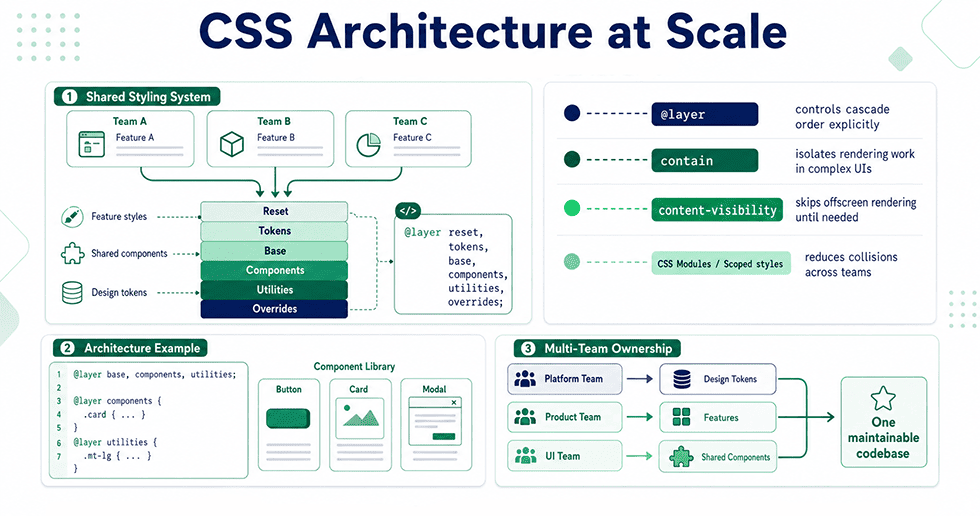
The first phase addresses a problem that only exists once a codebase reaches real size: individual good decisions don't automatically add up to a maintainable system. You'll study architectural patterns beyond BEM and ITCSS - CUBE CSS, layered specificity with @layer, and CSS containment - along with strategies for managing style ownership across multiple teams working in one codebase. This phase also covers auditing an existing large stylesheet for architectural debt, a skill senior developers use constantly when inheriting legacy code. By day 20, you should be able to propose and justify an architecture for a new large-scale project, not just follow one someone else designed. This foundation directly supports everything the following phases build on top of it.
| Days | Topic | Description |
| Days 1-3 | Architecture Patterns Beyond BEM | Study CUBE CSS and other post-BEM methodologies, comparing their handling of composition and utility versus BEM's block-based approach. Understand which problems each pattern solves that the others don't. |
| Days 4-6 | Native CSS Layers (@layer) |
Learn @layer for explicit cascade ordering independent of specificity or source order. Understand how layers solve the "third-party CSS overriding my styles" problem that plagued large teams before native support existed. |
| Days 7-9 | CSS Containment & Performance-Aware Architecture | Study contain and content-visibility for isolating rendering work in large component trees, and how architectural boundaries affect browser rendering performance at scale. |
| Days 10-12 | Style Ownership in Multi-Team Codebases | Learn patterns for scoping styles to teams or features (naming conventions, CSS Modules, shadow DOM encapsulation) to prevent unintended overrides in large organizations. |
| Days 13-16 | Auditing Legacy CSS Architecture | Practice identifying architectural debt in an existing large stylesheet: specificity wars, dead code, inconsistent naming, and unclear ownership boundaries. |
| Days 17-20 | Architecture Proposal & Review | Draft and document a full CSS architecture proposal for a hypothetical large-scale project, including naming conventions, layer structure, and team ownership boundaries. |
Architecture Projects:
- A refactor of a legacy stylesheet. Take a large, unstructured CSS file (your own from earlier study phases works well) and refactor it using a documented architecture pattern. This project builds the specific skill of improving existing code, not just writing new code cleanly.
- A multi-team component library simulation. Build a small component set with clear ownership boundaries using CSS Modules or scoped naming, simulating how two teams would avoid style collisions in a shared codebase.
- An
@layer-based cascade structure. Build a project with base styles, component styles, and utility overrides organized into explicit layers, demonstrating predictable override behavior regardless of source order. - A written architecture decision record (ADR). Document a real architectural choice - why you chose one pattern over another - in the format teams use for technical decision records. This is a genuinely senior-level artifact for a portfolio.
Architecture Practice Tips:
- I recommend studying the CSS architecture of a real open-source design system (like Material or Carbon) before writing your own proposal. Seeing decisions made at genuine scale grounds your understanding in practice, not theory.
- I suggest writing your architecture proposal as if a real team will review it, including trade-offs you considered and rejected. That discipline is exactly what senior-level technical writing looks like on the job.
- You should time-box the legacy refactor project deliberately, since real audits happen under deadline pressure - practicing that constraint now builds a genuinely useful skill.
- I advise treating
@layeras a tool for a specific class of problems, not a replacement for good naming and structure. Layers manage the cascade; they don't fix an unclear naming convention underneath them.
Days 21-40: Build and Govern a Design System
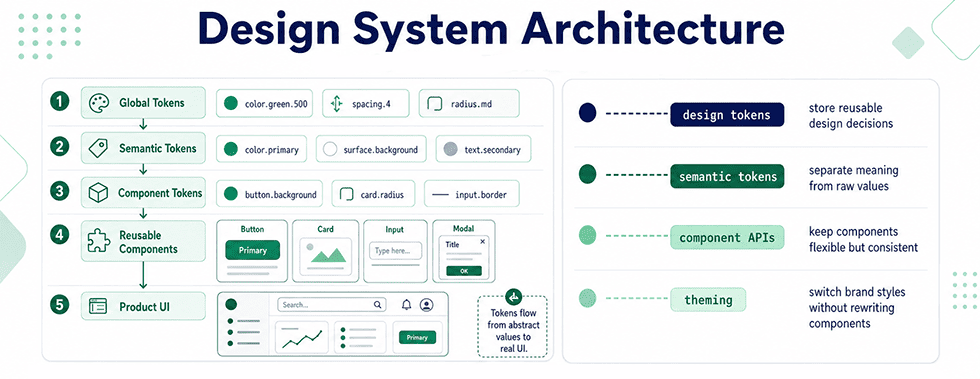
This phase moves from individual architecture decisions into building a complete design system - the shared source of truth a design system, once built well, prevents dozens of small inconsistencies across a product. You'll cover design tokens at a system-wide level, component API design, documentation practices, and versioning a system as it evolves. This is one of the clearest markers of senior-level frontend work, since design systems require balancing developer flexibility against consistency, a genuinely difficult trade-off. By day 40, you should have built a documented, reusable component library from the ground up.
| Days | Topic | Description |
| Days 21-23 | Design Tokens at System Scale | Study multi-tier token architecture (global tokens feeding semantic tokens feeding component tokens) and how this layering supports theming and rebranding without touching component code. |
| Days 24-26 | Component API Design | Learn to design component props and CSS custom property APIs that are flexible enough for varied use cases but constrained enough to prevent visual inconsistency across a product. |
| Days 27-29 | Building the Core Component Set | Build the foundational components most design systems share: buttons, inputs, cards, and typography, each driven entirely by your token system rather than hardcoded values. |
| Days 30-32 | Documentation & Storybook | Learn to document components using a tool like Storybook, including usage guidelines, prop tables, and accessibility notes - documentation quality is often what separates a usable system from an ignored one. |
| Days 33-36 | Versioning & Governance | Study semantic versioning for design systems, deprecation strategies for breaking changes, and governance models for accepting contributions from multiple teams. |
| Days 37-40 | Full System Assembly & Review | Assemble the tokens, components, and documentation from this phase into one cohesive, versioned design system package. |
Design System Projects:
- A multi-tier token system. Build a token architecture with global, semantic, and component-level layers, demonstrating how a single global token change (like a brand color) propagates correctly through the system.
- A documented component library in Storybook. Build 6-8 core components with full Storybook documentation, including prop tables, usage examples, and accessibility notes for each.
- A themeable design system demo. Apply your token system to produce two distinct visual themes from the same component code, proving the system's actual flexibility rather than just describing it.
- A design system README and contribution guide. Write the documentation a real team would need to contribute to your system consistently - naming conventions, versioning policy, and a component request process.
Design System Practice Tips:
- I recommend studying a component's actual usage patterns across a real product before finalizing its API. Overly flexible components are as much of a maintenance problem as overly rigid ones.
- I suggest documenting each component as you build it, not after the whole library is finished. Documentation written in hindsight tends to miss the small decisions that mattered most during construction.
- You should deliberately introduce one breaking change partway through this phase and practice versioning it properly. Handling breaking changes gracefully is a skill senior developers are expected to have, not just know about.
- I advise studying how two or three real, publicly documented design systems handle governance. The organizational side of a design system is often harder than the code itself, and it's rarely covered in tutorials.
Days 41-60: Compare CSS-in-JS and Utility-First Styling
This phase addresses one of the most actively debated topics in modern frontend architecture - and one senior developers are routinely asked to weigh in on. You'll build the same component set using three distinct approaches: traditional CSS/Sass, a CSS-in-JS library, and a utility-first framework, then compare bundle size, runtime performance, developer experience, and maintainability directly rather than relying on secondhand opinions. This is the phase most directly aimed at developing independent, defensible technical judgment.
| Days | Topic | Description |
| Days 41-44 | CSS-in-JS Fundamentals | Study a CSS-in-JS library (such as styled-components or Emotion), covering runtime versus compile-time approaches, dynamic styling based on props, and their impact on bundle size and initial render performance. |
| Days 45-48 | Utility-First Frameworks in Depth | Study Tailwind's utility-first model in depth, covering configuration, the purge/JIT compilation process, and the argument that utility classes reduce context-switching between markup and styles. |
| Days 49-51 | Rebuilding One Component Set Three Ways | Rebuild the same 4-5 components using plain CSS/Sass, a CSS-in-JS library, and a utility-first framework, keeping visual output identical across all three. |
| Days 52-54 | Performance & Bundle Size Comparison | Measure and compare bundle size, runtime style-injection overhead, and rendering performance across the three implementations from Days 49-51 using real profiling tools. |
| Days 55-57 | Team & Maintainability Trade-offs | Study non-technical factors that influence this decision in real teams: designer-developer handoff, onboarding time for new hires, and long-term refactoring cost under each approach. |
| Days 58-60 | Written Comparison & Recommendation | Write a formal technical comparison document recommending one approach for a hypothetical project, with reasoning grounded in the measurements taken during this phase. |
Styling Strategy Projects:
- The same component set, built three ways. Implement an identical 4-5 component set in plain CSS, CSS-in-JS, and a utility-first framework. This is the anchor project for the entire phase and the basis for every comparison that follows.
- A bundle size and performance report. Measure and document the actual bundle size and runtime performance differences across your three implementations, using browser DevTools and a bundler analyzer.
- A styling approach decision document. Write a one-page technical recommendation, as if presenting to a real team, arguing for one approach for a specific hypothetical project with stated constraints (team size, performance requirements, timeline).
- A hybrid approach prototype. Build a small project combining utility classes for layout with CSS-in-JS or CSS Modules for complex component logic, testing whether a hybrid approach resolves trade-offs neither pure approach handles well.
Comparison Practice Tips:
- I recommend resisting a personal favorite until after you've measured all three approaches directly. Most of the online debate on this topic is opinion-based; your own numbers are more convincing and more useful.
- I suggest testing on a throttled network and a mid-tier device when comparing performance, since bundle size differences that seem negligible on a fast development machine can matter significantly on real user devices.
- You should interview or read interviews with developers who've maintained large codebases in each approach, since maintainability differences often only become visible after months, not during initial development.
- I advise writing your final recommendation as genuinely conditional - "Tailwind fits X team under Y constraints" - rather than a universal verdict. That conditional reasoning is what senior technical judgment actually sounds like.
Days 61-80: Run a WCAG Accessibility Audit
This phase moves from applying accessibility best practices, covered at the middle level, into auditing accessibility formally against the WCAG standard - a skill directly tied to legal compliance risk for US companies under the ADA. You'll learn to conduct a structured audit using the WCAG success criteria, document findings for a non-technical audience, and prioritize fixes by severity and legal risk rather than by convenience.
| Days | Topic | Description |
| Days 61-64 | WCAG Structure & Conformance Levels | Study the WCAG framework's four principles (Perceivable, Operable, Understandable, Robust) and the A, AA, and AAA conformance levels, including which level US legal standards typically reference. |
| Days 65-68 | Manual Audit Methodology | Learn a structured manual audit process: keyboard-only navigation testing, screen reader walkthroughs, color contrast verification, and semantic structure review, each mapped to specific WCAG success criteria. |
| Days 69-71 | Automated Tooling & Its Limits | Study automated audit tools (axe, Lighthouse, WAVE) and understand precisely what they can and cannot catch - automated tools typically flag a minority of real WCAG violations, so manual review remains essential. |
| Days 72-75 | Writing an Audit Report | Learn to document audit findings for a mixed audience of developers and stakeholders: severity ratings, WCAG criteria references, and concrete remediation steps rather than vague descriptions. |
| Days 76-80 | Full Audit on a Real Project | Conduct a complete WCAG audit on a substantial project (your own design system from the earlier phase works well), producing a full report and a prioritized remediation plan. |
Accessibility Audit Projects:
- A full WCAG audit report. Conduct a structured audit of your design system or another substantial project, documenting every finding with its WCAG success criterion reference and severity rating. This is the centerpiece deliverable for the phase.
- A remediation implementation. Fix the top five highest-severity issues identified in your own audit, then re-test to confirm the fixes resolve the underlying WCAG violation, not just its symptom.
- A screen reader comparison test. Test the same interface with two different screen readers (such as VoiceOver and NVDA) and document behavioral differences, since assistive technology doesn't behave identically across platforms.
- An accessibility statement and compliance summary. Write a public-facing accessibility statement for a project, summarizing its conformance level and known limitations - a real artifact many organizations are now legally expected to publish.
Audit Practice Tips:
- I recommend auditing a project you didn't build yourself at least once this phase. Auditing your own work makes it easy to unconsciously excuse decisions you already understand the reasoning behind.
- I suggest cross-referencing every automated tool finding against the actual WCAG success criterion text, since tools sometimes flag issues in a way that oversimplifies or misstates the actual requirement.
- You should practice writing audit findings for a non-technical stakeholder audience specifically, since translating technical accessibility issues into business and legal risk language is a distinct and valuable senior-level skill.
- I advise prioritizing your remediation list by genuine user impact and legal exposure, not by which fixes are fastest to implement - that prioritization judgment is exactly what audit work is meant to develop.
Days 81-100: Set and Enforce Performance Budgets
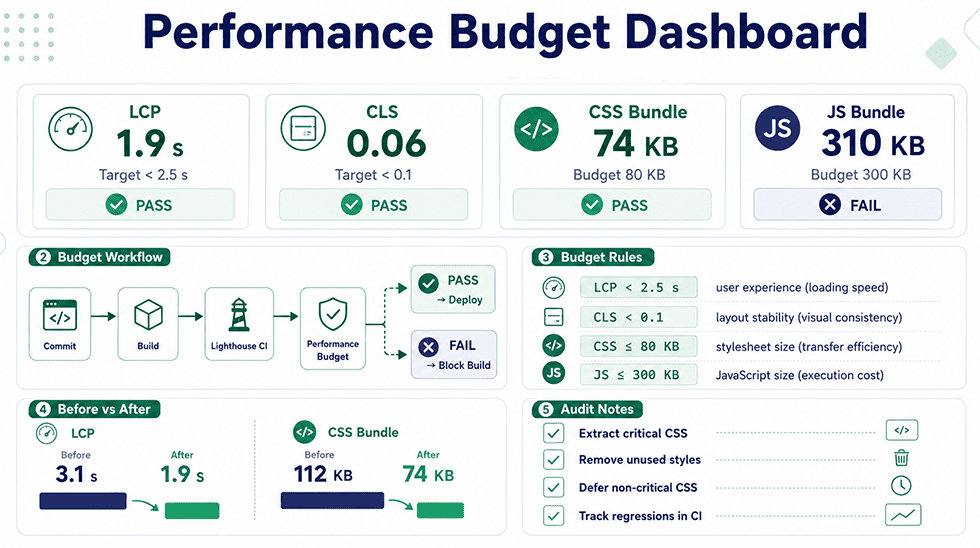
The final phase covers performance budgets - defined, measurable limits on metrics like bundle size, load time, and Core Web Vitals that a team commits to maintaining. You'll learn to set realistic budgets based on real user data, integrate budget enforcement into a build pipeline, and diagnose CSS-specific performance issues like render-blocking stylesheets and unused CSS at scale. This closing phase ties together architecture, design systems, and the styling-approach comparison from earlier phases into a single performance-conscious perspective.
| Days | Topic | Description |
| Days 81-84 | Core Web Vitals & CSS's Role | Study Largest Contentful Paint, Cumulative Layout Shift, and Interaction to Next Paint, focusing specifically on how CSS decisions (render-blocking stylesheets, layout shifts from late-loading fonts) affect each metric. |
| Days 85-88 | Setting a Performance Budget | Learn to define a performance budget based on real user data (from tools like CrUX or RUM data) rather than arbitrary targets, and how budgets differ across device and network conditions. |
| Days 89-91 | Eliminating Unused & Render-Blocking CSS | Study tools and techniques for identifying unused CSS at scale, critical CSS extraction, and strategies for loading non-critical stylesheets without blocking initial render. |
| Days 92-95 | Budget Enforcement in CI/CD | Learn to integrate automated performance budget checks into a build pipeline, so a bundle size or Core Web Vitals regression fails a build before reaching production. |
| Days 96-100 | Full Performance Audit & Capstone | Conduct a complete performance audit on your design system or capstone project from earlier phases, set a formal budget, and document the improvements made to meet it. |
Performance Projects:
- A performance budget document. Define a formal performance budget for a real project, including specific numeric limits for bundle size, LCP, and CLS, justified with real user data rather than arbitrary numbers.
- A critical CSS extraction implementation. Implement critical CSS inlining for above-the-fold content on a real project, measuring the LCP improvement directly before and after.
- A CI-integrated budget check. Set up an automated check in a build pipeline (using a tool like Lighthouse CI) that fails a build when bundle size or Core Web Vitals exceed defined thresholds.
- A full capstone performance audit. Audit your design system project from Weeks 4-6 against your own performance budget, documenting every optimization made and its measured impact.
Performance Practice Tips:
- I recommend basing your performance budget on real user data whenever possible, since lab-only testing (like a single Lighthouse run on a fast connection) often understates real-world performance problems.
- I suggest treating render-blocking CSS as a default suspect whenever LCP is worse than expected, since it's one of the most common and most fixable causes of a slow perceived load.
- You should set your CI budget thresholds slightly stricter than your current baseline, not looser, since a budget that never fails a build isn't actually enforcing anything.
- I advise documenting the before-and-after impact of every optimization with real numbers. That documentation is exactly the kind of evidence-backed communication senior developers are expected to bring to performance discussions with a team.
Senior-Level HTML & CSS Resources
| Resource | Type | Best For |
| web.dev | Free documentation & guides | Deep, practical coverage of Core Web Vitals and performance budgets, directly aligned with Weeks 13-14. |
| Best Way to Study HTML, CSS, and JavaScript Together | Free article | A practical guide to connecting HTML, CSS, and JavaScript in one learning workflow, useful for reinforcing how foundational frontend technologies work together before and alongside senior-level system design. |
| Storybook Official Documentation | Free documentation | The primary reference for component documentation practices used throughout the design systems phase. |
| Scrimba | Paid training | Structured, in-depth WCAG audit training that goes beyond automated tooling, aligned with Weeks 10-12. |
| Bro Code (YouTube) | Paid course | Strong coverage of CSS-in-JS concepts and performance reasoning relevant to Weeks 7-9. |
| Smashing Magazine - Design Systems & Architecture articles | Free articles | Real-world case studies from teams that have built and maintained production design systems at scale. |
What You Should Be Ready to Own After 100 Days
Completing 100 days of html and css work at this depth builds a fundamentally different skill set than the beginner and middle-level plans - this phase is about systems, judgment, and communication as much as it is about code. This checklist is meant as an honest gauge of readiness for senior-level responsibility, not a formality. If any item here still feels uncertain, that's a clear signal for which phase to revisit before stepping into senior-level work or interviews. Every item below reflects something a real team would expect a senior frontend developer to own without close supervision. Use it to confirm genuine readiness, since senior-level roles carry consequences that junior and mid-level mistakes typically don't.
- Design and document a scalable CSS architecture and design system that multiple teams could adopt and extend without confusion.
- Conduct a formal WCAG accessibility audit and produce a prioritized remediation report a legal or compliance team could act on directly.
- Make and defend a reasoned, evidence-based recommendation on CSS-in-JS versus utility-first approaches for a given project's specific constraints.
- Define, enforce, and report on a performance budget integrated into a real build pipeline, with measurable before-and-after impact.
Frontend development at the senior level doesn't stay confined to CSS, and the strongest senior candidates bring range across the full stack of a modern frontend role. If system-level thinking now feels natural, the next logical step is strengthening the JavaScript and tooling side of that same skill set - starting with the language that powers every interactive layer sitting on top of the architecture you've just learned to design, and the version control discipline that makes collaborating on systems like these actually work in practice.
You should pay attention to Git & GitHub in 40 Days: A Free Study Plan for Senior Developers