
Best Way to Study HTML, CSS, and JavaScript Together
04 August 2026
254 views
This article is up to date as of October 2026

Written by
Ethan Robinson,
Middle Frontend Developer

Reviewed by
Claire Whitman,
Accessibility & Markup Specialist
If you're new to web development, one question comes up pretty quickly: should HTML, CSS, and JavaScript be learned separately, or does it make more sense to work on all three at once? This guide will help you learn HTML CSS JavaScript the smart way, with an approach that overlaps all three from the start.
Beginners often go to one extreme or the other. Some spend weeks going through HTML lessons before they write their first line of CSS. JavaScript gets pushed even further back because it looks more complicated. Others start with JavaScript almost immediately, then get stuck because they are still unsure how a normal webpage is structured. Neither route is particularly comfortable.
A better way is to overlap them. HTML still comes first, but CSS should follow fairly soon. JavaScript can be added once basic pages no longer feel completely unfamiliar. You don't need to be equally good at all three. You simply need enough of each to see how they fit into the same page. HTML handles the structure, CSS changes how that structure looks, and JavaScript deals with behaviour and interaction. You will eventually use them together anyway, so it makes sense for at least part of your study time to work the same way - that's really what a good web development learning path looks like.
Why HTML, CSS, and JavaScript Work Best Together
A basic contact form already shows why separating these subjects too much can be awkward. HTML gives you the form itself: labels, input fields, a message area, and a submit button. CSS takes care of spacing, widths, fonts, colours, and how the form behaves on a smaller screen. JavaScript can check whether the required fields have been filled in before the user submits anything.
If you study these pieces within the same small project, the reason for learning a particular property or method is easier to see. You're not just practising syntax because it appeared in the next lesson.
It also makes mistakes more useful. Perhaps the form exists but looks wrong. That probably sends you back to CSS. Perhaps the button looks fine but nothing happens when you click it. Now you're looking at JavaScript. After a while, you begin to recognise which part of the page is responsible for which problem. This doesn't mean learning everything at once. At first, most of your work will probably be HTML and CSS. JavaScript can take a larger share later.
Understand the Role of Each Technology
Before getting too far into tutorials, it helps to be clear about what each technology actually does.
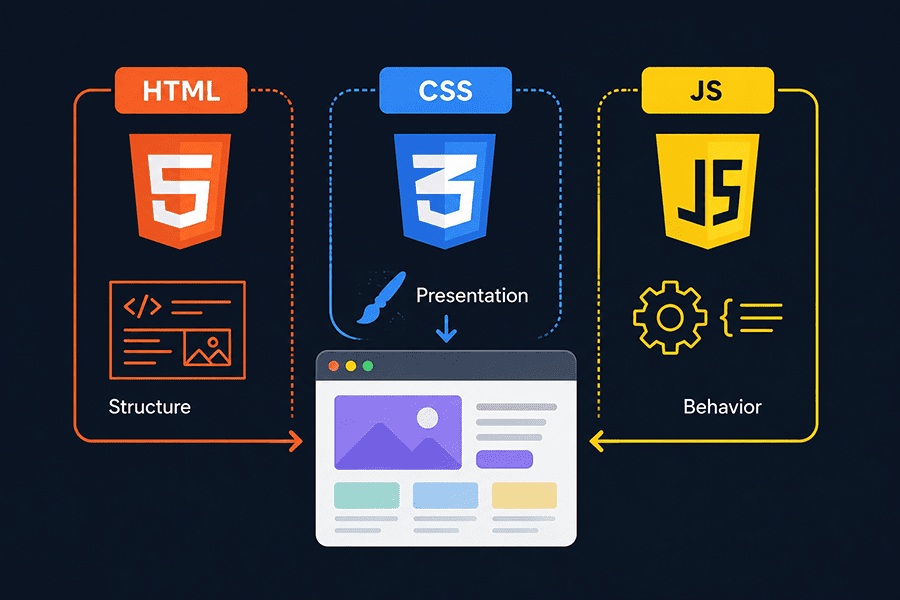
HTML is responsible for content and structure. Headings, paragraphs, images, links, forms, navigation and sections all begin there.
CSS works with presentation. It controls things such as fonts, colours, spacing, page layout, responsive behaviour and animation.
JavaScript handles what happens when something changes or a user does something. A click can open a menu. A form can be checked before submission. Content can appear without reloading the whole page.
If you'd rather follow a structured HTML CSS JavaScript roadmap instead of piecing lessons together yourself, use the links above as your starting point.
The difference is easier to remember when you put it into an actual page:
| Technology | What you're working on | Example in a contact form |
| HTML | Page structure and content | Input fields, labels and the submit button |
| CSS | Appearance and layout | Field spacing, button styles and mobile layout |
| JavaScript | Behaviour | Checking required fields before submission |
| HTML + CSS + JavaScript | The finished feature | A usable, styled form that responds to user input |
You will run into situations where the boundaries are less obvious, but this simple division is enough when you're starting.
7 Tips for Studying HTML, CSS, and JavaScript Together
Start with HTML, Then Add CSS Immediately
HTML should be the first step. Without some idea of how a page is structured, CSS has very little to work with.
What you don't need is several weeks spent trying to memorise every HTML tag. Learn the elements you're likely to use in ordinary pages: headings, paragraphs, links, images, lists, buttons, forms, tables and semantic sections. Then build something small with them. It can be a profile page, a basic article page or even a contact page.
Once you can put together a simple page, start using CSS on that same HTML. This is where many of the early concepts begin to make more sense. A heading isn't just an <h1> anymore. You can change its font size, spacing and alignment. A few sections that originally appear one under another can become a layout. A plain button starts looking like an actual interface element.
You also get immediate feedback, which matters when you're learning. If a CSS rule does something unexpected, you can change it and see the result in the browser straight away. There is no reason to wait until your HTML knowledge feels "complete." It won't. You'll keep finding new HTML details while learning CSS and JavaScript.
Introduce JavaScript Gradually
JavaScript usually takes more time to get comfortable with. For many beginners, it is the first real programming language they encounter, so the type of problems changes.
Instead of mostly dealing with page structure and appearance, you now have variables, functions, conditions and events to think about. Later there will be much more, but those basics are enough to start adding useful behaviour to a page.
Keep the first examples small. If you already built a page with a button, make the button show or hide some text. If you have a navigation menu, make it open and close. If you've made a contact form, check whether a required field is empty.
These aren't impressive applications, and that's fine. The useful part is that the JavaScript has a reason to exist. You can see what the code changed. Separate JavaScript exercises still have a place. Sometimes you need to practise a function or condition without worrying about CSS at the same time. Just don't leave everything in isolated exercises. Bring the idea back into one of your webpages once you understand the basics.
Build Small Projects Every Week
Waiting until the end of a long course to build something is usually frustrating. By that point, you've covered so much material that it can be difficult to decide what to use first. Small projects are easier to handle. Good beginner projects include:
- Personal profile page
- Responsive landing page
- Digital clock
- Calculator
- To-do list
- Simple quiz application
They don't all need to become portfolio pieces. A digital clock might take only a small amount of code, but it gives you a reason to work with JavaScript and update something on the page. A landing page gives you much more CSS practice. A to-do list brings several things together.
Try not to follow a tutorial for every detail. If a lesson shows you how to make a basic page, change something afterwards without copying the instructor. Add another section. Change the layout. Make a button do something different. You will probably break things while doing this. That's useful practice too. Finding out why your own change caused a problem is much closer to real development than copying code that already works.
Create a Simple and Consistent Study Routine
Long study sessions aren't automatically better. Someone who writes code for an hour on four or five days of the week may get more out of it than someone who watches six hours of lessons on one day and then doesn't touch the project again until the following weekend. A simple routine is enough. Learn something new, use it, and return to older material often enough that it doesn't disappear from memory.
For example:
- Learn one new HTML, CSS, or JavaScript concept.
- Use it in a project you've already started.
- Add one small feature without following exact instructions.
- Go back over anything you couldn't explain or reproduce on your own.
The order can change. Some days will be mostly learning. Other days you may spend the whole session trying to fix one layout problem. One or two focused hours can be plenty, especially at the beginning. There is also no benefit in rushing through five new topics if you haven't had time to use the previous two. The important part is returning to the code regularly. Frontend development for beginners becomes easier when basic actions stop requiring so much thought, and that comes from repetition.
Don't Rely Only on Video Tutorials
An HTML CSS JavaScript tutorial in video form is useful, particularly when a concept is completely new. Seeing somebody build a layout or explain a JavaScript function can be much easier than trying to understand it from a short definition.
The problem starts when watching takes up most of your study time. Following an instructor gives you a lot of clues. You know what file to open, what code comes next and roughly what the final result should look like. When those clues disappear, the same project can suddenly feel much harder.
After a lesson, try closing the video and rebuilding at least part of what you just watched. You don't have to remember every property or every line of JavaScript. Look things up when you need to. The useful part is deciding for yourself what the page needs and where the code belongs. If you get stuck, don't immediately replay the exact part of the tutorial. Read the error message. Check your code. Search the documentation. Even ten minutes spent trying to understand the problem can teach you more than copying the correct line straight away.
Learn How to Read Documentation
Documentation can look unpleasant when you're just starting. There are unfamiliar terms, short examples and plenty of pages that assume you already know something else.
You don't need to sit down and read documentation from beginning to end. Use it for a specific reason. If you forget how an HTML element works, check that element. If a CSS property isn't doing what you expected, read about the property and look at its examples. If you're using a JavaScript method and can't remember what it returns, check that method.
This is different from searching for a complete tutorial every time you have a problem. At first, you may still need tutorials for larger topics. That's normal. But documentation becomes much less intimidating once you use it regularly for small questions. It also teaches you to look for the exact thing you don't understand. Instead of searching for "CSS layout not working," you may eventually realise that the problem is specifically related to display, spacing or alignment. That makes finding an answer much easier.
Practice by Rebuilding Real Websites
You don't always need to invent a project yourself. Existing websites give you plenty to practise with.
Pick something relatively simple at first: a landing page, blog homepage, product card or another layout you recognise. Then try to recreate the main structure without copying the site's code. The goal isn't a pixel perfect copy. Look at how the page is organised. Work out which elements probably sit inside the same container. Notice where the spacing changes. Resize the browser and see what happens to the layout on a smaller screen. Later, choose pages with more going on. You can try responsive navigation, forms, galleries or simple animations once those topics are familiar.
This kind of exercise is useful because the design problem has already been decided for you. Your job is to work out how to reproduce it with the HTML, CSS and JavaScript you know. Keep these recreations as practice. Copying another site's design and presenting it as your own project is obviously a different matter.
Common Mistakes Beginners Should Avoid
Switching learning resources too often is an easy trap for a beginner frontend developer. Then you find a different JavaScript teacher, a CSS playlist and a new roadmap. Soon you're repeating beginner lessons in several places without spending much time actually building anything. Use other explanations when you're stuck, but try to keep one main course or learning plan long enough to make progress. Another common problem is worrying about frameworks too early. There will always be another library, framework or tool being discussed. If ordinary HTML, CSS and JavaScript are still difficult, adding more tools usually gives you more things to debug rather than making development simpler.
Comparing yourself with experienced developers doesn't help much either. Someone who has been building websites for years should be faster than a beginner. A better comparison is your own older work. Open a project from a few weeks ago. If you can see problems that you didn't notice when you wrote it, you've learned something.
Some parts of frontend development click quickly. Others don't. You might understand a CSS property in one lesson and then spend half an hour the next day trying to work out why the same idea isn't working in a different layout. JavaScript can be even less predictable at first. Keep building anyway. Every project gives you a few problems you haven't seen before. Sometimes you'll solve them properly. Sometimes you'll find a fix and only understand why it works later. Both happen when you're learning.
It can also be useful to return to old projects instead of always starting new ones. Make an old page responsive. Clean up the CSS. Add a small JavaScript feature. Fix a form that you originally built without much thought about structure. Those changes make progress easier to notice because you're working with something you already understand. You don't need to reach a point where you remember all the syntax. Developers look things up. What matters is becoming less dependent on step by step instructions and more comfortable working out what to try next.
Conclusion
HTML, CSS and JavaScript don't need to be treated as three completely separate courses.
Start with HTML because you need to understand the structure of a webpage. Add CSS fairly early and use it on pages you've already made. JavaScript can come after that, starting with small pieces of interaction rather than a large application.
The projects don't need to be complicated. A page with a form can give you HTML practice, plenty of CSS work and a small JavaScript task. A responsive landing page can later get a menu or another interactive feature.
Spend enough time away from tutorials to find out what you can actually build yourself. When something stops working, try to understand the problem before looking for the finished solution. There isn't a point where you've finally "finished" HTML or CSS and can forget about them. You'll keep learning all three while building new things. For a beginner, that overlap is useful. It's how separate lessons gradually turn into real frontend coding skills rather than staying three unrelated subjects..
Frequently Asked Questions
Should I learn HTML, CSS, and JavaScript at the same time?
Yes, but not in the sense of studying all three equally from the first day. Start with basic HTML and learn how a page is put together. Once you can create headings, paragraphs, links, images, and a simple form, bring in CSS. JavaScript can follow a little later, when the page itself no longer feels unfamiliar. After that, use all three in the same small projects. A contact form is a good example: HTML creates the fields, CSS handles the layout, and JavaScript checks the input. Learning this way makes the connection between the technologies much clearer than keeping them in separate study blocks for weeks. Learning this way makes the connection between the technologies much clearer than keeping them in separate study blocks for weeks - it's simply the better way to learn web development.
How long does it take to learn HTML, CSS, and JavaScript?
Four to six months is a reasonable estimate for building a solid beginner foundation if you practise regularly, but the number itself is not very useful without context. Someone studying for an hour most days will progress differently from someone opening a course once a week. HTML basics usually come first, CSS takes longer because layout needs practice, and JavaScript adds programming concepts that may need more repetition. It also depends on what you mean by "learn." Being able to follow a tutorial is one level. Building a small responsive page and adding basic interaction without copying every step is another. Use projects, not the calendar, to judge your progress.
Is JavaScript harder than HTML and CSS?
JavaScript for beginners is often the hardest part, yes. HTML and CSS have their own difficulties, but JavaScript is usually the first point where you have to think in programming logic rather than mainly structure and presentation. Variables, functions, conditions, events, arrays, and other concepts can feel abstract at first. It gets easier when those ideas are attached to something visible. Instead of learning a function only as an isolated exercise, use one to open a menu, show a hidden message, or check a form field. You will still need separate JavaScript practice, especially later, but connecting new concepts to pages you already built makes the first stage much less confusing.
Do I need to master HTML before learning CSS?
No. You need enough HTML to understand the basic structure of a page, but there is little value in waiting until you know every element before starting CSS. Learn the tags you will use often: headings, paragraphs, links, images, lists, buttons, forms, and semantic sections. Then start styling pages while you continue improving your HTML. In practice, CSS often exposes gaps in your markup. You may realise that a section is difficult to lay out because the HTML structure is awkward, so you go back and fix it. The same thing happens later with JavaScript. These skills develop together, even if HTML is the first one you touch.
What should I build as my first frontend project?
A personal profile page or a simple landing page is a sensible first project because it gives you enough to practise without becoming too large. Build the structure with HTML, then work on spacing, typography, colours, and a responsive layout in CSS. When that feels manageable, add one small JavaScript feature. It could be a mobile menu, a button that shows extra text, or a basic form check. After that, try a digital clock, calculator, to-do list, or quiz. The first project does not need to be original or impressive. It is more useful to finish a small project you understand than to copy a complex application line by line.
Others Also Read
- Master HTML Faster: Web Programming Guide Most popular
- How to Start Learning CSS with Courses, Apps, Youtube Channels & Games Most popular
- How to Start Learning HTML: Beginner Guide for 2026 Most popular