
Best Frontend Projects for Beginners to Build Real Experience
07 August 2026
256 views
This article is up to date as of October 2026

Written by
Daniel Carter,
Principal Frontend Engineer

Reviewed by
Miles Bennett,
Senior Frontend Architect
Learning HTML, CSS, and JavaScript gives you the tools to start building websites. Tutorials are useful for figuring out how those tools work, but following lessons and writing your own project are quite different experiences — that gap is one of the biggest challenges in beginner web development.
In a tutorial, most of the decisions have already been made. You know which file to open, which feature comes next, and usually what the finished page should look like. Start a project on your own and those clues disappear. You have to decide how to structure the page, why the layout breaks on a smaller screen, or what to do when a JavaScript function doesn't behave as expected. That is why frontend projects matter. They force you to use what you've learned instead of simply recognizing it when somebody else writes the code.
Projects are useful for a portfolio as well. Employers looking at junior frontend applications can see more from a working website or application than from a list of completed courses. A few projects can show responsive design, JavaScript work, code organization, and the kinds of problems you've already dealt with. Building a handful of beginner frontend projects like these is often what turns a resume into something worth a second look.
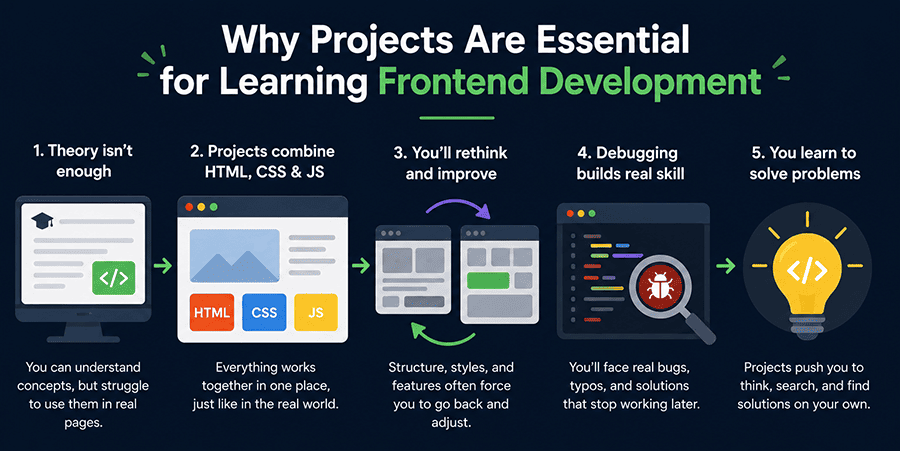
Why projects are essential for learning frontend development?
Programming needs practice. You can understand a lesson about events or Flexbox and still struggle to use the same idea in a page you designed yourself. HTML CSS JavaScript projects put all three technologies in the same place, which is exactly why they matter more than isolated lessons. You may begin with perfectly reasonable HTML, then realize the structure makes the CSS awkward. Later, a JavaScript feature may force you to rethink part of the markup again. That kind of backtracking is normal. You also spend more time debugging when the code is your own. Sometimes the problem is a typo. Sometimes the first solution simply stops making sense after another feature is added. Courses can introduce these situations, but a guided project usually gives you the answer fairly quickly. Your own project makes you look for it.
Start with small projects first
Large applications are tempting because they look more impressive. They are also easy to abandon when half of the features require concepts you haven't learned yet.
A smaller project gives you a better chance of getting from an empty folder to a finished result. That matters. Choose something where most of the work feels familiar but one part doesn't. Perhaps you already know basic HTML and CSS but haven't built a responsive navigation menu. Or you understand simple JavaScript events but haven't stored data in the browser yet.
You don't have to decide everything before you start. The list below covers several solid JavaScript project ideas, from simple to more involved.
Personal portfolio website
Personal portfolios are some of the most common frontend portfolio projects, and a practical first one doesn't need complicated application logic.
The first version can contain an introduction, your skills, several projects, and contact information. Most of your time will go into HTML structure and CSS: spacing, typography, sections, and the way the page changes on smaller screens.
It is also a project you can keep. When you build something better, add it. When your CSS improves, come back and clean up the old layout. That makes the portfolio slightly different from a calculator or quiz. It can start as a beginner exercise and change along with the rest of your work.
Responsive landing page
For example, use this project - Responsive Landing Page .
A landing page puts more attention on CSS. You have navigation, buttons, text blocks, and sections that need to look sensible at different screen widths. There is enough design work to make the project interesting without requiring much JavaScript.
Try building the layout without copying somebody else's code line by line. You can use a page or design as a reference, but work out the HTML structure and CSS yourself.
The desktop version is often the easy part. Resize the browser and the weaknesses become more obvious: text wraps differently, sections become cramped, navigation stops fitting, or spacing that looked fine before suddenly feels wrong. Fixing those problems is the project.
Calculator application
A calculator looks simple, which is part of what makes it useful. There aren't many visual elements to distract you. Most of the work is in JavaScript: button events, values, functions, calculations, and deciding what the application should do after each action.
You quickly run into questions that aren't obvious when looking at the finished interface. What happens when the user presses another operator? How should the displayed value change? Which part of the code should handle each button?
The original version doesn't need every possible feature. Once it works, keyboard support or calculation history can give you another problem to solve.
To-do list application
For more practice, check out this project - Type-Safe To-Do List .
A to-do list adds more interaction between the user, the page, and your JavaScript or TypeScript. A user should be able to create a task, mark it as finished, edit it, or remove it. If you add local storage, the tasks can still be there after the browser is refreshed.
None of those actions is particularly complicated on its own. The interesting part appears when they all affect the same list. This is usually where code organization starts to matter more. A script that felt perfectly manageable with an "Add task" button may become messy after editing and deleting are added. That is useful to experience early.
Weather application using an API
We recommend this project - Weather Dashboard App
A weather application introduces data that isn't already sitting inside your HTML or JavaScript. The page requests weather information from a public API and then has to show the returned data. That means working with asynchronous JavaScript, external data, errors, and updates to the page after the initial load.
It is a natural project to try after basic JavaScript no longer feels new. You also have more states to think about. The application may be waiting for data, displaying the result, or dealing with a failed request. The interface has to make sense in each case.
Expense tracker
An expense tracker has more data moving around than the earlier projects. Users can enter expenses, place them in categories, calculate totals, and review what they have added. Forms, arrays, objects, events, and local storage all have a place here.
Start with the basic version. Filters, search, or charts can wait until adding and displaying expenses works properly. This project can also expose weak points in the way you've structured your JavaScript. When one expense is edited or deleted, other information on the page may need to change too. The more features you add, the more noticeable poor organization becomes.
Movie search application
A movie search application gives you another reason to work with an external API. The user enters a movie name, the application requests matching data, and the results appear on the page. Posters, descriptions, and ratings give you several pieces of dynamic content to handle.
You will need to deal with the request itself, a loading state, errors, and a layout that still works when the number or size of results changes.
The project is a step up from a calculator because you don't control all of the information in advance. Your interface has to react to what comes back.
Simple e-commerce product page
There is no need to build an entire store for this project. A product page can already include categories, search, an image gallery, and basic shopping cart behaviour. That is enough to create several connected pieces of interface without turning the project into something you spend months trying to finish.
As the first version becomes stable, you can add sorting, favorites, or checkout pages. Be careful with the scope. E-commerce projects are particularly easy to keep expanding. Finishing a smaller version and understanding the code is more useful than planning twenty features and completing four of them.
Quiz application
We recommend studying this project - Quiz App .
A quiz keeps the visual side fairly simple and moves most of the work into React. The application has to show questions, record answers, calculate a score, and display a result. Timers, progress indicators, or randomized questions can be added afterwards.
Arrays and conditions have an obvious purpose here. So do loops, functions, and variables. Instead of practising those concepts separately, you're using them to keep the quiz moving from one question to the next. You can also change the subject of the quiz without changing the basic idea of the application, which makes it easy to experiment with the same logic.
Clone a real website
After a few smaller projects, try rebuilding the homepage of an existing website. This is an exercise, not something to present as your own design. Look at the page and work out how you would build it with your own code.
Pay attention to the things that are easy to overlook when you're following a tutorial: widths, spacing between sections, typography, repeated components, and what happens when the viewport becomes narrower. Some sections will probably take far longer than expected. That's useful information. If a navigation layout or card grid repeatedly gives you trouble, you've found something worth practising.
What you can practise with each project
| Project | Main areas to practise | Possible next addition |
| Personal portfolio | HTML, CSS, responsive layout | Update it as new projects are finished |
| Landing page | Layout, typography, navigation | Improve its responsive behaviour |
| Calculator | Events, functions, conditions | Keyboard support or history |
| To-do list | DOM work, task management, local storage | Editing existing tasks |
| Weather app | API requests, asynchronous JavaScript, errors | Improve how returned data is displayed |
| Expense tracker | Forms, arrays, objects, local storage | Filters, search, or charts |
| Movie search | API data, loading states, dynamic content | Improve search results and responsive layout |
| Product page | Search, filtering, user interaction | Sorting, favorites, or checkout pages |
| Quiz | Arrays, conditions, loops, functions | Timer or randomized questions |
| Website clone | Layout, spacing, responsive design | Rebuild a more difficult page |
How to make your projects stand out
A project that technically works can still feel unfinished when you put it in a portfolio.
Use it for a while before calling it done. Resize the page. Try the buttons in a different order. Enter unexpected values into forms. Look for places where the interface becomes confusing or something stops working. Then clean up what you found. For a portfolio project, it makes sense to:
- organize the code so you can still follow it later;
- write a short description of what the project does;
- add screenshots and a live demo;
- check the responsive layout;
- test the main features in different browsers and on different devices.
These aren't extra features. They are part of finishing the project. There is a point where building another similar landing page stops adding much. Your next project should give you at least one problem you haven't dealt with before. That might mean using an API for the first time, storing data locally, working on accessibility, or improving performance.
Old projects can do the same job. Open something you built a few months earlier and read the code again. You may find a layout that now seems unnecessarily complicated or a JavaScript function you would no longer write that way. Fix it. Revisiting old work is a straightforward way to see whether your skills have changed. You don't have to keep producing completely new projects to keep practising.
Conclusion
A frontend project is useful when it makes you make decisions.
A portfolio or landing page is enough when you're still working through HTML and responsive CSS. A calculator or quiz puts more pressure on JavaScript. A to-do list adds changing data and local storage. Weather and movie applications bring APIs into the picture. You don't need to build every project in this article, and you don't need ten versions of the same one.
Pick something you can mostly understand, but not completely. Finish the basic version before adding more features. When it works, spend some time fixing the rough parts instead of immediately starting another tutorial. Keep the projects you understand. Those are the ones you'll be able to explain later.
Frequently asked questions
What is the best first frontend project for beginners?
A personal portfolio website is a good first project because the scope is easy to control and the result stays useful after the exercise is finished, and it becomes the foundation of your frontend developer portfolio going forward. Start with a short introduction, a skills section, a few project cards, and contact information. Most of the work will be HTML and CSS, so you can concentrate on page structure, spacing, typography, and responsive behaviour. You can add JavaScript later if there is a reason for it. The portfolio also gives you somewhere to put the next projects you build. As your code improves, you can return to the same site and rewrite parts that now look awkward.
How many frontend projects should I build before applying for jobs?
The source recommends roughly five to eight good projects, but the number matters less than what those projects show. If six projects are almost identical landing pages, the portfolio still covers a narrow set of skills. A smaller mix can tell a clearer story: one responsive site, a JavaScript project, something that uses local storage, and an application that works with an API. Before applying, remove projects you no longer want to discuss. You should know how the remaining ones work and be able to explain the choices you made. A portfolio becomes weaker when it is full of exercises you barely remember building.
Should I include tutorial projects in my portfolio?
A tutorial project can stay in your portfolio if you have done enough work on it to make it yours. Copying the instructor's final version line for line is useful practice, but it says little about the decisions you can make independently. Change the layout, add a feature, reorganize the code, or rebuild the project later without the tutorial open. Those changes give you problems to solve rather than instructions to follow. If you keep a tutorial based project, make sure you understand every important part of it. During an interview, being able to explain the code matters more than whether the original idea was completely unique.
Which project helps improve JavaScript the most?
There is no single project that teaches all of JavaScript equally well. A calculator is useful for events, functions, variables, and conditions. A quiz adds arrays, loops, and scoring logic. A to-do list introduces more DOM changes and can use local storage. Weather and movie search applications add API requests, loading states, and content that changes after data arrives. That progression is more useful than jumping straight into one large application. Start with the type of JavaScript you already partly understand, then choose the next project because it introduces one new problem. Several small projects can expose gaps in your knowledge faster than one oversized project.
Do recruiters care more about projects or certificates?
The source puts more weight on projects because they show practical work rather than course completion alone. A portfolio lets an employer see the kind of pages and applications you have built, including responsive layouts, JavaScript behaviour, and the way you organize your work. A certificate can still show that you completed a course, but it does not replace the project itself. If you include a project, make it easy to review: add a short description, screenshots, and a live demo when you have one. More importantly, know the code well enough to discuss it. A simple project you can explain is more useful than an impressive one you mostly copied.
Others Also Read
- 15 Most Important Skills for a Frontend Developer in 2026 Most popular
- 12 Best AI Tools for Frontend Development in 2026. My opinion Most popular
- How to Become a Front-End Developer in 2026? Most popular
- Complete Frontend Developer Roadmap for Beginners in 2026 New article
- Frontend Developer Career Path New article
- Common Mistakes Beginners Make When Learning Frontend Development New article