

15 Most Important Skills for a Frontend Developer in 2026
11 March 2026
3602 views
This article is up to date as of October 2026

Written by
Daniel Carter,
Principal Frontend Engineer

Reviewed by
Maya Desai,
Senior JavaScript Engineer
Frontend development has evolved rapidly over the past decade. What once involved mainly static HTML pages and simple styling now requires deep knowledge of modern JavaScript frameworks, performance optimization techniques, accessibility standards, and collaborative development workflows. Companies building digital products expect frontend developers to create interfaces that are fast, accessible, responsive, and scalable. Because of this shift, understanding the most important skills for frontend developer roles has become essential for anyone planning to enter the field or grow professionally within it.
Modern frontend developers are responsible for much more than writing markup and styling pages. They build complex user interfaces, integrate data from APIs, optimize applications for performance, and collaborate closely with designers and backend engineers. The role now requires a balanced combination of technical expertise, architectural thinking, and practical problem-solving. Developers must understand browser behavior, maintain clean component structures, and ensure that applications work consistently across devices and environments.
As the frontend ecosystem continues to expand, new tools and frameworks appear every year. However, strong fundamentals remain the foundation of every successful developer. Learning these 15 important skills for frontender positions allows professionals to build reliable applications, adapt to new technologies quickly, and remain competitive in the modern job market.
What Frontend Skills Every Developer Should Know?
Frontend development requires a wide range of technical abilities that extend far beyond simple webpage styling. Developers must understand how user interfaces are structured, how applications communicate with servers, and how modern frameworks organize complex codebases. A professional developer must also think about accessibility, performance, collaboration, and long-term maintainability when building web applications.
To better understand the skills required in the industry, it helps to organize them into clear categories. A structured frontend skills list highlights the core areas developers should focus on while learning or improving their capabilities.
These areas include fundamental web technologies, modern frameworks, architecture concepts, user experience principles, performance optimization strategies, and collaboration tools used in professional development teams.
The table below summarizes the major skill areas and explains why each category matters for modern frontend development.
| Area | Skills | Why It Matters |
| Fundamentals | HTML5, CSS3, Modern JavaScript (ES6+), Logic & Interactivity, TypeScript | The fundamentals define how web interfaces are structured, styled, and programmed. Strong knowledge in this area ensures developers can build reliable and maintainable frontend foundations. |
| Frameworks | React, Vue, Angular, Next.js, Nuxt, SvelteKit | Frameworks organize complex applications into reusable components and structured architectures, making large-scale frontend development manageable and scalable. |
| Data & Architecture | State management, API integration, REST, GraphQL, data fetching libraries | This area ensures that applications handle data efficiently and maintain predictable state across complex interfaces and user interactions. |
| UX & Layout | Responsive design, mobile-first layouts, grid systems, UI consistency | User interfaces must adapt to different devices and screen sizes while maintaining clarity, usability, and visual hierarchy. |
| Accessibility & UX Collaboration | Accessibility (a11y), ARIA attributes, keyboard navigation, design system collaboration | Accessible design allows applications to be usable by all users and ensures frontend developers implement inclusive and well-designed interfaces. |
| Performance Optimization | Web performance optimization, Core Web Vitals, lazy loading, code splitting | Performance directly impacts user experience and search rankings, making optimization a critical responsibility in modern frontend development. |
| Development Tooling | Git, GitHub, version control workflows, CI integration | Modern development teams rely on version control systems to collaborate efficiently, review code, and manage project history safely. |
| Quality Assurance | Testing frameworks, debugging tools, browser DevTools, end-to-end testing | Quality assurance helps maintain stable applications by identifying errors early and ensuring consistent behavior across browsers and devices. |
| AI-Assisted Development | AI coding assistants, AI refactoring tools, design-to-code generators | AI workflows help developers accelerate coding tasks, generate prototypes, and improve productivity while still maintaining control over the codebase. |
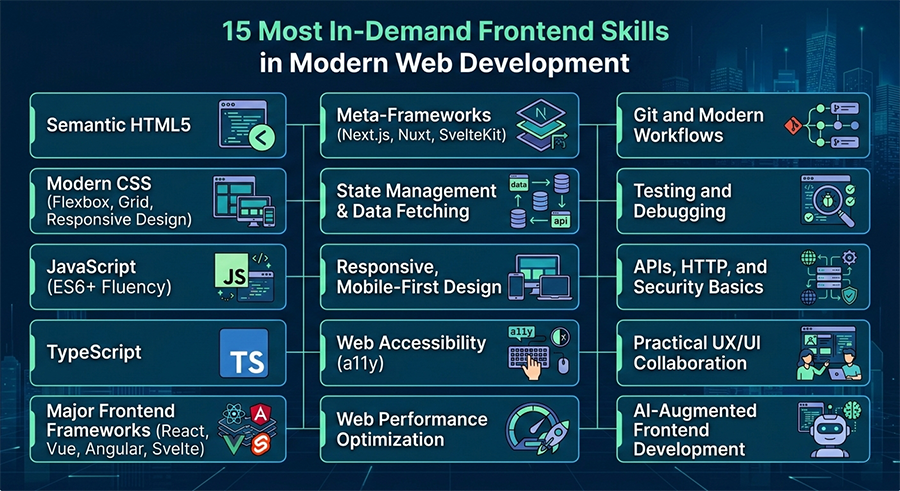
15 Most In-Demand Frontend Skills in Modern Web Development in 2026
Frontend development continues to evolve as web applications become more interactive, scalable, and performance-driven. Modern developers must combine strong fundamentals with advanced tooling, frameworks, and collaborative workflows. Companies expect developers not only to build interfaces but also to optimize performance, integrate APIs, maintain accessibility standards, and collaborate closely with product teams. Because of this, understanding the most in-demand frontend skills is essential for developers who want to remain competitive in the industry.
In 2026, frontend development requires a broad technical toolkit that spans programming, design implementation, performance engineering, and collaboration.
The following sections highlight fifteen essential skills that modern frontend developers use in real production environments. Each skill reflects common expectations found in professional development teams and modern job descriptions.
Semantic HTML5
Semantic HTML5 remains the foundation of modern frontend development. While frameworks and JavaScript libraries change frequently, the structure of web documents still relies on properly organized HTML markup. Semantic HTML helps developers build interfaces that are easier to understand, maintain, and scale as projects grow. By using meaningful tags such as <header>, <section>, <article>, and <nav>, developers create a clear document hierarchy that improves both usability and search engine visibility.
In real projects, semantic markup also plays an important role in accessibility. Screen readers and assistive technologies rely on semantic elements to interpret page structure correctly. When developers use proper HTML semantics, users with disabilities can navigate the interface more effectively. This also supports modern accessibility standards and improves overall user experience. Another benefit of semantic HTML is long-term maintainability. Clean document structure makes collaboration easier because developers can quickly understand how content and layout are organized. In production environments, semantic HTML supports:
- better SEO performance
- improved accessibility compliance
- clearer code structure for large projects
Modern CSS (Flexbox, Grid, Responsive Design)
Modern CSS has transformed how developers design and structure layouts. Instead of relying on outdated techniques such as floats or table-based layouts, developers now use powerful systems like Flexbox and CSS Grid to create flexible and responsive interfaces. These technologies allow developers to design complex layouts while maintaining clean and maintainable code. Responsive design is especially critical because modern users access websites on a wide variety of devices. Mobile phones, tablets, laptops, and large monitors all require different layout strategies. Developers must design interfaces that adapt seamlessly to different screen sizes while maintaining visual consistency and usability.
In real-world applications, CSS is also used for animations, transitions, and design systems. Developers frequently implement reusable styling patterns that maintain consistency across large applications. Utility-first frameworks such as Tailwind CSS or component frameworks like Bootstrap can accelerate UI development while still allowing customization.
JavaScript (ES6+ Fluency)
JavaScript remains the core programming language of frontend development. Modern web applications rely on JavaScript to handle user interactions, manage application state, fetch data from APIs, and dynamically update user interfaces. Mastery of modern JavaScript syntax and browser APIs is essential for building interactive web applications. Developers must understand concepts such as closures, asynchronous programming, event handling, and modular code organization. ES6 and later versions of JavaScript introduced features like arrow functions, modules, destructuring, and promises, which significantly improved the readability and maintainability of frontend code.
In production applications, JavaScript powers features such as:
- dynamic UI updates without page reloads
- communication with backend APIs
- client-side validation and interactive forms
Because JS is deeply integrated with modern frameworks and browser environments, strong language fundamentals allow developers to work effectively with any frontend technology stack.
TypeScript
TypeScript has become increasingly popular in large frontend projects because it introduces static typing to JavaScript applications. By defining types for variables, functions, and components, developers can detect errors earlier in the development process. This improves code reliability and makes complex applications easier to maintain. Large teams benefit especially from TypeScript because it creates clear contracts between different parts of the application. Developers can understand how data flows between components and APIs without reading every line of implementation code. This makes collaboration easier and reduces bugs caused by incorrect data structures.
In real projects, TypeScript improves developer productivity by enabling better IDE support, clearer documentation, and safer refactoring. When applications scale to thousands of lines of code, strong typing becomes extremely valuable for maintaining stability.
Major Frontend Frameworks (React, Vue, Angular, Svelte)
Modern web applications often rely on frameworks to manage complexity and organize code efficiently. Frameworks such as React, Vue, Angular, and Svelte provide structured approaches for building component-based user interfaces. Component architecture allows developers to divide applications into smaller reusable units. Each component manages its own logic, state, and presentation. This approach makes large projects easier to maintain and improves code reusability across different parts of the application.
In professional development environments, frameworks also provide tools for routing, state management, and performance optimization. They simplify complex tasks such as updating UI elements when application data changes. React currently dominates many job postings, but other frameworks remain important depending on project requirements and company preferences. Understanding at least one major framework allows developers to build scalable applications that meet modern product expectations.
Meta-Frameworks (Next.js, Nuxt, SvelteKit)
Meta-frameworks extend traditional frontend frameworks by providing additional features required for production applications. Tools such as Next.js, Nuxt, and SvelteKit include built-in routing systems, server-side rendering, static site generation, and optimized data fetching. These frameworks help developers create applications that perform well both in terms of speed and search engine visibility. Server-side rendering allows pages to load faster and improves SEO because search engines can index content more easily.
Meta-frameworks also simplify deployment and performance optimization. Many of them integrate with hosting platforms that automatically handle caching, image optimization, and code splitting. This allows developers to focus more on application logic and less on infrastructure configuration. For modern frontend teams, meta-frameworks are becoming the default architecture for building scalable production applications.
State Management & Data Fetching
As frontend applications grow in complexity, managing data flow becomes increasingly important. State management tools help developers track how application data changes over time and ensure that UI components update correctly when new information arrives.
Developers often work with both local and global state. Local state may exist within individual components, while global state can affect the entire application. Tools such as Redux, Zustand, or Pinia help manage these data flows efficiently.
Data fetching is another critical part of frontend development. Applications frequently retrieve information from APIs using REST or GraphQL. Libraries like React Query or TanStack Query simplify this process by handling caching, synchronization, and background updates. Proper state management ensures that complex applications remain predictable and maintainable even as the number of components grows.
Responsive, Mobile-First Design
Responsive design ensures that web interfaces function correctly across all device types. Mobile-first design strategies prioritize smaller screens and progressively enhance layouts for larger displays. This approach reflects modern usage patterns where mobile devices dominate web traffic.
Frontend developers must design layouts that adapt dynamically to screen sizes while preserving usability. This includes adjusting typography, spacing, navigation systems, and content structure. Responsive design requires testing across multiple environments to ensure consistent behavior. Developers often use device emulators and real hardware testing to verify layout performance. A well-designed responsive interface improves user engagement and reduces bounce rates.
Web Accessibility (a11y)
Accessibility ensures that web applications can be used by people with disabilities. Developers must design interfaces that support keyboard navigation, screen readers, and other assistive technologies.
Accessibility practices include:
- using semantic HTML structure
- applying ARIA attributes when necessary
- ensuring sufficient color contrast
- managing keyboard focus states
In many industries, accessibility is not only a best practice but also a legal requirement. Organizations that prioritize accessibility create more inclusive digital products while improving overall usability for all users.
Web Performance Optimization
Performance optimization focuses on making web applications load and respond quickly. Slow interfaces negatively impact user experience and search engine rankings. Developers must understand how to minimize JavaScript payloads, optimize images, and reduce rendering delays.
Important techniques include code splitting, lazy loading, and asset compression. Tools such as Lighthouse and browser developer tools help developers analyze performance bottlenecks and measure improvements.
Performance optimization becomes especially important in large applications where many components and network requests are involved.
Git and Modern Workflows
Version control systems are a fundamental part of modern software development, especially when multiple developers collaborate on the same project. Git allows developers to track every change made to the codebase, revert mistakes, and experiment with new features safely through branching. Instead of editing the same files directly, developers create separate branches where they can build features, fix bugs, or test improvements without affecting the main application.
In professional environments, Git is rarely used alone. It is usually combined with collaborative platforms such as GitHub, GitLab, or Bitbucket. These platforms enable teams to manage code reviews, track issues, and maintain a clear development history. A typical workflow involves creating feature branches, submitting pull requests, and having other developers review the changes before merging them into the main branch.
Modern workflows also integrate automation through continuous integration (CI) pipelines. These pipelines automatically run tests, check code quality, and ensure that the application builds correctly whenever code is updated. This process helps detect problems early and prevents unstable code from reaching production.
A typical Git workflow in modern development teams includes:
- creating feature branches for isolated development work
- submitting pull requests for code review before merging
- reviewing code collaboratively to maintain consistent coding standards
- running automated tests through CI pipelines
- resolving merge conflicts safely when multiple developers modify the same files
Testing and Debugging
Testing plays a critical role in maintaining the reliability of modern web applications. As applications grow in size and complexity, it becomes difficult to manually verify every feature after each update. Automated testing helps ensure that new changes do not break existing functionality. Developers typically write unit tests to verify small pieces of logic, component tests to validate UI behavior, and end-to-end tests to simulate real user interactions. Testing is especially important in frontend development because user interfaces often involve many interactive elements. A small mistake in state management or event handling can cause unexpected behavior. Automated tests allow developers to detect these issues early in the development process.
Debugging skills are equally important. Even well-tested applications occasionally produce unexpected errors. Developers must analyze browser console messages, inspect network requests, and trace application logic through different components to identify the source of the problem.
APIs, HTTP, and Security Basics
Frontend applications rarely function in isolation. Most modern interfaces communicate with backend services to retrieve and update data. Because of this, frontend developers must understand how APIs work and how data flows between the client and the server.
Developers typically interact with APIs using HTTP requests such as GET, POST, PUT, and DELETE. These requests retrieve or modify data stored on backend servers. API responses are usually returned in JSON format, which frontend applications process and display in the user interface. Understanding how requests are structured, how responses are parsed, and how errors are handled is essential for building reliable web applications.
Security awareness is also an important part of frontend development. Even though backend systems handle most security logic, frontend developers must understand authentication flows and safe data handling practices. For example, developers should know how tokens are stored securely, how cross-origin requests are managed through CORS policies, and how common vulnerabilities can affect client-side code. A strong understanding of API communication allows frontend developers to build dynamic applications such as dashboards, social platforms, and e-commerce systems that interact seamlessly with backend services.
Practical UX/UI Collaboration
Frontend development sits at the intersection of design and engineering. Developers translate visual concepts created by designers into working user interfaces that users interact with daily. Because of this, effective collaboration between designers and developers is essential for building successful products.
Design tools such as Figma, Sketch, or Adobe XD allow designers to create detailed layouts that include typography systems, color palettes, spacing guidelines, and component structures. Frontend developers must understand how to interpret these designs and translate them into responsive, functional code. This process requires attention to detail and an understanding of design systems. Collaboration also involves communication and feedback. Developers often identify technical constraints that may affect a design, while designers may suggest usability improvements. Product teams work together to balance visual design, technical feasibility, and user experience.
Strong UX/UI collaboration helps ensure that:
- interfaces remain visually consistent across the application
- user interactions behave as expected across devices
- design systems are implemented accurately in code
When designers and developers collaborate effectively, the final product becomes both visually appealing and technically reliable.
AI-Augmented Frontend Development
Artificial intelligence is becoming an important part of modern development workflows. AI-assisted coding tools can help developers generate code snippets, refactor existing components, and analyze project structures. Tools such as GitHub Copilot, Cursor, and other AI-powered editors can significantly accelerate development tasks.
These tools are especially helpful for repetitive coding patterns such as building UI components, generating API requests, or creating boilerplate code structures. Developers can use AI suggestions as a starting point and then customize the implementation according to project requirements. However, professional developers must still maintain full understanding and control of the code they produce. AI-generated solutions should always be reviewed carefully to ensure they follow project architecture, security practices, and performance requirements. Blindly accepting generated code can introduce bugs or inefficient patterns.
When used responsibly, AI tools allow developers to focus on higher-level problem solving rather than repetitive tasks. This enables teams to build features faster while still maintaining strong engineering standards. As AI capabilities continue to evolve, the ability to integrate these tools into development workflows will become an increasingly valuable skill for frontend developers.
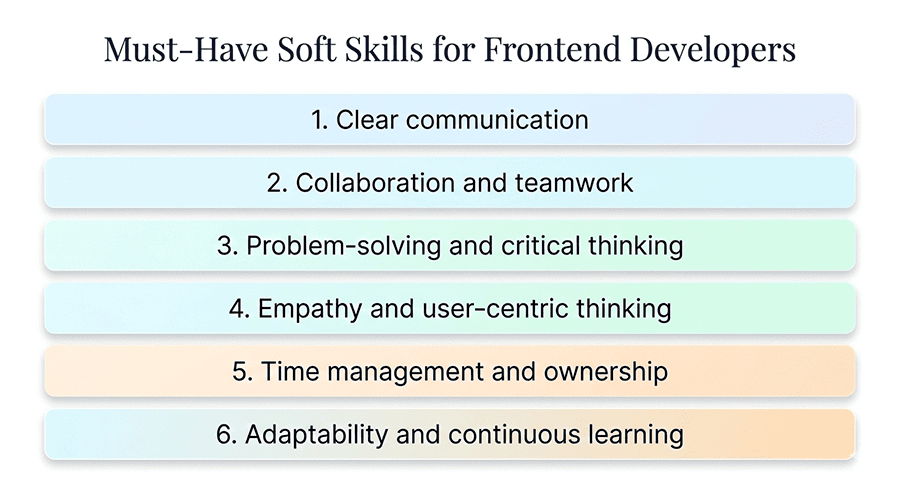
Must-Have Soft Skills for Frontend Developers in 2026
Technical knowledge alone is no longer enough for success in modern frontend development. Developers are expected to collaborate closely with designers, backend engineers, product managers, and QA teams while building complex user interfaces. Because of this collaborative environment, strong communication and problem-solving abilities are just as valuable as coding expertise. In many companies, soft skills are considered must have skills for frontend developer roles because they directly influence how effectively a developer can contribute to team productivity and product quality.
One of the most important soft skills in 2026 is clear communication. Frontend developers often translate design concepts into working interfaces and must explain technical limitations or alternative solutions to designers and product teams. Strong communication ensures that everyone involved in the project shares the same understanding of goals and requirements.
Another essential skill is adaptability. The frontend ecosystem evolves rapidly, with new frameworks, tools, and development practices appearing regularly. Developers who stay curious and continuously learn new technologies can adapt to these changes more easily. Time management and attention to detail are also critical. Frontend developers frequently work on multiple components or features simultaneously, and maintaining high code quality while meeting deadlines requires disciplined organization.
Finally, teamwork and constructive feedback play a major role in successful development environments. Developers who participate actively in code reviews, share knowledge with colleagues, and remain open to feedback help create stronger and more efficient development teams.
-
Clear communication
You need to explain technical decisions in simple language to designers, product managers, and non‑technical stakeholders. This includes writing clear messages (tickets, docs, comments) and actively listening so requirements and expectations are understood on both sides. -
Collaboration and teamwork
Modern frontend is almost always team‑based: you implement designs, integrate APIs, and coordinate changes with others. A collaborative mindset - sharing context, handling feedback calmly, and helping unblock teammates - directly impacts delivery speed and product quality. -
Problem‑solving and critical thinking
Frontend developers constantly debug layout issues, race conditions, and weird browser bugs, so structured problem‑solving is essential. Employers value people who can isolate issues, question assumptions, and choose trade‑offs (performance vs. complexity vs. deadlines) instead of blindly following tutorials. -
Empathy and user‑centric thinking
Empathy helps you design and implement interfaces that feel intuitive for real users, not just “look correct in Figma.” This also ties into accessibility: considering different abilities, devices, and contexts when building components makes your work more inclusive and valuable. -
Time management and ownership
You’re often juggling multiple tickets, reviews, and bugfixes, so being able to estimate, prioritize, and deliver on time is critical. Taking ownership - communicating blockers early, breaking tasks into smaller steps, and pushing features across the finish line - builds trust quickly. -
Adaptability and continuous learning
The frontend ecosystem changes fast (framework updates, AI tools, design trends), so you need to adapt without chasing every shiny thing. Curiosity, willingness to learn from code reviews, and comfort with new tools (like AI assistants) are now seen as core professional traits, not “nice‑to‑have.”
Practice Frontend Skills
Learning frontend development requires far more than understanding theoretical concepts. Many beginners spend significant time reading documentation or watching tutorials but struggle when it comes to building real applications. The ability to apply knowledge in practical scenarios is what transforms theoretical understanding into professional skill. Developers must regularly practice frontend skills by writing code, solving real interface problems, and experimenting with different approaches to building user interfaces.
Coding challenge platforms can also help developers strengthen their logical thinking and problem-solving abilities. Platforms such as LeetCode, CodeWars, and similar environments allow developers to solve algorithmic tasks and practice JavaScript fundamentals in structured exercises. These challenges improve code efficiency and help developers become more comfortable debugging complex problems.
One of the most effective ways to develop practical experience is by creating small projects that simulate real product features. For example, developers can build responsive landing pages, interactive dashboards, form validation systems, or dynamic components such as modals and dropdown menus. These projects help developers understand how layout systems, JavaScript logic, and API integrations work together in real applications. Another valuable learning method is contributing to open-source projects. By working with existing codebases, developers learn how professional teams structure applications, organize components, and manage collaboration through version control systems.
If you want to accelerate your progress, explore the practical frontend exercises available on our website. These tasks are designed to help you build real components, strengthen your coding confidence, and apply frontend concepts in realistic development scenarios.
How to Improve Frontend Development Skills in 2026?
Continuous improvement is essential for frontend developers because the ecosystem evolves rapidly. New frameworks, performance techniques, and development workflows appear every year, which means developers must regularly refine their knowledge and adapt their skill sets. Many beginners ask how to improve frontend skills efficiently without becoming overwhelmed by the number of available technologies. Experienced developers often emphasize practical learning, structured study, and collaboration as the most effective ways to grow professionally.
Below are four expert recommendations that highlight proven strategies for improving frontend development skills in real-world environments.
Conclusion
Frontend development continues to evolve as web technologies become more powerful and user expectations grow higher. Developers today must combine strong technical knowledge with practical experience, collaboration skills, and an understanding of modern development workflows. From mastering HTML, CSS, and JavaScript fundamentals to working with frameworks, APIs, and performance optimization techniques, each skill plays an important role in building modern web applications.
For companies hiring developers, clearly defining the required frontend skills in a job description helps attract candidates whose expertise matches the needs of the project. A well-structured description allows employers to communicate expectations about technologies, responsibilities, and development workflows. This clarity reduces hiring risks and ensures that new team members can contribute effectively from the beginning.
For developers seeking opportunities in the industry, understanding the frontend developer skills commonly required in professional environments provides a roadmap for learning and career development. By focusing on practical projects, strengthening fundamental knowledge, and continuously improving technical abilities, developers can build the expertise necessary to succeed in modern frontend roles. Ultimately, both employers and developers benefit from clear expectations and well-defined skill requirements in today’s competitive web development landscape.
Frequently Asked Questions (FAQ)
What are the most important frontend skills beginners should focus on when starting web development?
Beginners entering frontend development should first focus on mastering the core web technologies: HTML, CSS, and JavaScript. These technologies form the foundation of every website and web application. HTML structures the content of a page, CSS controls layout and visual presentation, and JavaScript enables interactivity and dynamic behavior. Once these basics are understood, beginners should expand their knowledge by learning responsive design techniques such as Flexbox and CSS Grid. These tools allow developers to create layouts that adapt to different screen sizes and devices. Another important skill is understanding how the browser works, including the DOM, events, and network requests. After building a strong foundation, developers can start learning modern frameworks like React or Vue, which help organize complex interfaces using reusable components. By focusing on fundamentals first and then gradually adding advanced tools, beginners can develop a solid skill set that aligns with real industry requirements.
How long does it usually take for beginners to develop strong frontend skills?
The time required to develop strong frontend skills varies depending on learning intensity and consistency. Someone studying part-time while working or attending school may need around eight to twelve months to build solid entry-level capabilities. Developers who dedicate several hours each day to learning and building projects often progress more quickly.
However, the learning process is not only about time spent studying but also about the type of practice involved. Developers who focus on building real projects tend to gain practical experience faster than those who rely only on theoretical lessons. Creating applications such as dashboards, portfolio sites, or small web apps helps reinforce concepts like state management, API integration, and responsive design. Continuous practice and regular problem-solving gradually build confidence and technical understanding. Over time, developers become more comfortable debugging issues, organizing code, and designing user interfaces that meet real-world requirements.
Do frontend developers need to learn backend technologies as well?
Frontend developers primarily focus on building user interfaces, but understanding basic backend concepts can be extremely beneficial. While they are not usually responsible for writing backend services, frontend developers frequently interact with APIs that deliver data to web applications. Knowledge of HTTP requests, REST or GraphQL APIs, authentication flows, and JSON data structures helps developers integrate frontend interfaces with backend systems effectively. Understanding these concepts also improves debugging skills when issues occur between the frontend and server.
Additionally, basic knowledge of security practices such as authentication tokens, cookies, and CORS policies allows developers to implement safer applications. Even though backend specialists usually manage server infrastructure, frontend developers who understand how backend systems work can collaborate more efficiently with backend engineers and build more reliable applications.
What types of projects help beginners strengthen their frontend development skills?
Practical projects are one of the most effective ways to strengthen frontend development skills. Instead of focusing only on tutorials, beginners should build applications that simulate real product features. Projects such as task management tools, weather dashboards, portfolio websites, or blog interfaces introduce important development concepts. Working on multiple projects also helps developers build a portfolio that demonstrates their abilities to potential employers. Each project shows practical experience with technologies and design patterns used in professional frontend development.
Are AI coding tools useful for beginners learning frontend development?
AI coding tools have become increasingly popular in modern development workflows. These tools can help beginners generate code examples, explain unfamiliar syntax, and accelerate repetitive tasks such as writing boilerplate components. Used correctly, AI assistants can support the learning process and help developers experiment with new technologies more quickly.
However, beginners should avoid relying entirely on AI-generated solutions. Understanding how the code works is essential for debugging problems and building reliable applications. Developers should always review AI-generated code, test it carefully, and modify it when necessary. When used as a learning assistant rather than a shortcut, AI tools can help developers explore different approaches to solving problems while still building their own technical understanding.
What is the best way for beginners to continuously improve their frontend skills?
Continuous improvement in frontend development requires consistent practice and exposure to new technologies. Developers should regularly build new projects, explore different frameworks, and study how modern applications are structured. Reading documentation, following industry blogs, and watching technical conference talks can also provide valuable insights.
Another effective approach is participating in coding communities and collaborative projects. Contributing to open-source repositories allows developers to work with experienced programmers and receive feedback on their code. Code reviews and collaborative discussions help developers identify areas for improvement and learn better development practices.
Finally, developers should focus on gradually expanding their knowledge rather than trying to learn everything at once. By mastering fundamentals first and then building advanced skills over time, developers can steadily grow their expertise and remain competitive in the evolving frontend ecosystem.
Others Also Read
- 12 Best AI Tools for Frontend Development in 2026. My opinion Most popular
- How to Become a Front-End Developer in 2026? Most popular
- 25 Best Frontend Tools for Developers in 2026. My Experience Most popular
- Complete Frontend Developer Roadmap for Beginners in 2026 New article
- Frontend Developer Career Path New article
- Common Mistakes Beginners Make When Learning Frontend Development New article