
Master HTML Faster: Web Programming Guide
29 April 2026
344 views
This article is up to date as of October 2026

Written by
Ethan Robinson,
Middle Frontend Developer

Reviewed by
Claire Whitman,
Accessibility & Markup Specialist
When I talk to beginners entering development, one question comes up again and again: where does real web development actually begin? In my experience, everything starts with web programming html. Not because HTML is the most complex technology - it clearly isn’t - but because it defines how you think about the web itself. Before frameworks, before state management, before performance optimization, there is structure. If you don’t understand how content is structured and interpreted by the browser, everything that comes later feels like memorization instead of real understanding.
What many people underestimate is how deeply HTML is connected to real-world engineering. It’s not just about tags like <div> or <p>.
It’s about building meaningful, accessible, and scalable structures that other layers - CSS and JavaScript - can rely on. I’ve seen developers struggle with layout
issues, accessibility bugs, and even SEO problems simply because their HTML foundation was weak. On the other hand, developers who invest time into HTML early tend to move faster
later, because they understand what the browser is actually doing.
If you want to master frontend development efficiently, you need to approach HTML not as a checklist, but as a system.
Learn how elements relate to each other, how the DOM is formed, and how structure affects styling and behavior. This mindset changes everything. Instead of copying code from tutorials, you start building interfaces intentionally. That’s the difference between “learning HTML” and actually thinking like a frontend developer.
What Is HTML in Modern Web Development?
In modern development, HTML remains the foundation of every web interface, even in applications built with advanced frameworks like React, Vue, or Angular. At its core, HTML is responsible for defining the structure of a page - headings, sections, navigation, forms, and content hierarchy. Everything you see in a browser starts as HTML, even if it’s dynamically generated. Understanding what is the purpose of learning html becomes clearer when you realize that all frontend tools ultimately produce or manipulate HTML in some form.
HTML does not exist in isolation. It works closely with CSS and JavaScript to create complete web experiences. HTML provides the structure, CSS controls layout and visual
presentation, and JavaScript adds interactivity and dynamic behavior. For example, a button is defined in HTML, styled with CSS, and enhanced with JavaScript to handle user
actions. If the HTML structure is poorly designed, both styling and interactivity become harder to implement and maintain. In modern web development, HTML also plays a critical
role in performance, accessibility, and SEO. Semantic HTML - using meaningful elements like <header>, <main>, <article>,
and <nav> - helps browsers, search engines, and assistive technologies understand the content more effectively. This is not just a best practice; it directly
impacts how applications are indexed, how fast they render, and how usable they are for different users.
Even in component-based frameworks, developers are constantly working with HTML-like structures (JSX, templates). That’s why strong HTML knowledge is not optional. It is the layer that everything else depends on, and mastering it gives you control over how your applications are built, structured, and experienced.
Why Learning HTML Is Important?
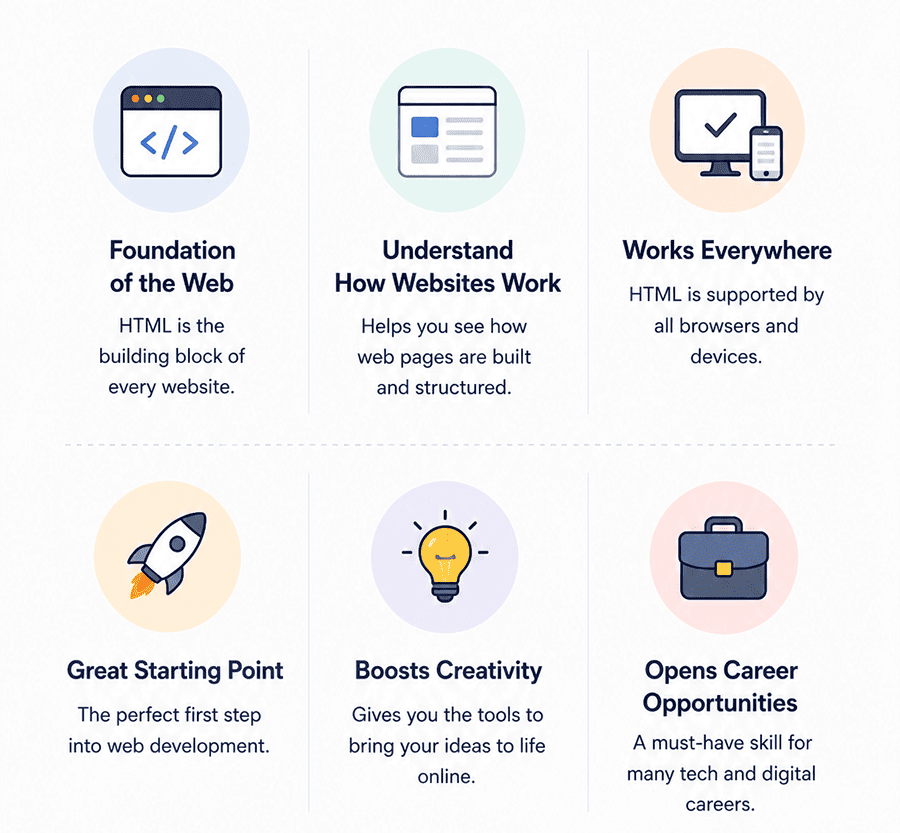
Understanding why learning html is important is something I wish more beginners took seriously at the start of their journey. HTML often looks deceptively simple, and because of that, many people rush through it or treat it as a “quick step” before moving to frameworks. That approach usually backfires. From my experience, the developers who grow the fastest are the ones who actually take time to understand HTML deeply, not just memorize tags. HTML shapes how you think about structure, content, and the relationship between different parts of a page.
Another thing that becomes clear over time is that HTML is everywhere. Even when you’re working with React, Vue, or server-rendered apps, you are still dealing with HTML under the hood. The difference is that strong HTML knowledge gives you control, while weak understanding forces you to rely on guesswork. If you want to build reliable, accessible, and scalable interfaces, HTML is not optional - it’s foundational.
- It builds a correct mental model of how the web works. HTML teaches you how browsers interpret structure and how content is organized, which is essential for everything that follows in frontend development.
- It makes CSS and layouts easier to understand. When your HTML structure is clean and logical, styling becomes predictable instead of frustrating and inconsistent.
- It improves accessibility and user experience. Semantic HTML ensures your pages work correctly for all users, including those using assistive technologies.
- It directly affects SEO and discoverability. Search engines rely on HTML structure to understand your content, which impacts how your site is indexed and ranked.
- It reduces long-term technical debt. Clean, well-structured HTML makes projects easier to maintain, scale, and refactor as they grow.
In the end, these advantages are not just “nice to have” - they define how effective you will be as a developer. Beginners who learn HTML Roadmap seriously build a foundation that supports faster learning, better code quality, and stronger long-term career growth.
Learning HTML Basics the Right Way
When I think about html language learning, the biggest mistake I see is people trying to learn everything at once without a clear structure. HTML itself is not complex, but the way you approach it determines how quickly you improve. If you treat it as a list of tags to memorize, you will forget most of it. If you treat it as a system - structure, hierarchy, meaning - everything starts to make sense much faster.
The key to learning html basics efficiently is focusing on what actually matters in real projects. You don’t need to know every tag from day one. Instead, you should understand how a page is built, how elements relate to each other, and how semantic structure improves readability and maintainability. I always recommend learning through small iterations: write code, open it in the browser, break it, fix it, and repeat. That loop is far more effective than passive reading.
Here’s a practical breakdown of what you should focus on first:
| Topic | What to Learn | Why It Matters |
| Document Structure | <!DOCTYPE>, <html>, <head>, <body> |
Helps you understand how every web page is organized from the ground up |
| Text Content | Headings, paragraphs, inline elements | Forms the base of all readable content on the web |
| Links & Navigation | <a>, internal/external links |
Essential for connecting pages and building navigation systems |
| Images & Media | <img>, alt attributes, media embedding |
Critical for visual content and accessibility |
| Lists | Ordered and unordered lists | Used in menus, features sections, and structured content blocks |
| Forms | Inputs, labels, buttons, validation basics | Enables user interaction and data collection |
| Semantic HTML | <header>, <main>, <section>, <article> |
Improves accessibility, SEO, and maintainability |
| Basic Accessibility | Proper tags, alt text, labels | Ensures your pages work for all users and meet modern standards |
If you follow this structure instead of jumping randomly between topics, HTML becomes much easier to learn. You build understanding step by step, and each concept reinforces the next. This approach not only saves time but also prepares you for CSS, JavaScript, and real-world frontend development much more effectively.
Practical HTML Projects That Build Real Skills
From my experience, the biggest gap between beginners and confident developers is not knowledge - it’s practice. You can watch any html tutorial, read documentation, and understand the theory, but until you build real pages, the knowledge doesn’t stick. Projects force you to think: how to structure content, how to organize sections, how to make a page readable and scalable. This is where real learning happens. Another important point is that projects reveal your weaknesses. When you try to build something from scratch, you quickly realize what you don’t understand - and that’s exactly what you need. Instead of passively consuming tutorials, you start solving problems, experimenting, and making decisions. That’s how HTML becomes a skill, not just information.
Below are five projects I recommend to anyone serious about mastering HTML:
| Project Name | Description | Skills Developed | Resources for Learning |
| Personal Profile Page |
This is usually the first project I suggest because it’s simple but very effective. You build a page about yourself with sections like bio, skills, projects, and
contact information. It forces you to structure content logically and think about readability. You’ll use headings, paragraphs, lists, images, and links in a
meaningful way. You’ll also learn how to organize sections using semantic HTML like <section> and <article>. The goal is not
design perfection, but clean structure and clarity.
|
Semantic structure, text hierarchy, links, images, content organization | MDN Web Docs, freeCodeCamp, simple html tutorial guides |
| Blog Layout Page |
This project introduces a more complex structure. You create a blog-style page with multiple articles, headers, footers, and navigation. It teaches how to structure
repeating content and maintain consistency across sections. You’ll also learn to use semantic elements like <article>,
<header>, <footer>, and <nav>. This project is important because many real-world websites are content-driven, and
understanding how to structure them properly is essential.
|
Semantic HTML, content grouping, reusable structure, navigation layout | MDN semantic HTML guide, blog layout html tutorial examples |
| Landing Page Structure | A landing page project focuses on building a real-world layout used in marketing websites. You’ll create sections like hero, features, testimonials, and contact blocks. This project teaches how to break a page into logical sections and structure them cleanly. You also start thinking about user flow - what the user sees first and how content is organized. Even without CSS, this project builds a strong understanding of page architecture. | Section structuring, layout thinking, content flow, accessibility basics | freeCodeCamp, landing page html tutorial, UI inspiration sites |
| Contact Form Page | Forms are critical in real applications, and this project focuses entirely on user input. You’ll build a contact form with inputs, labels, buttons, and basic validation attributes. This teaches you how to properly associate labels with inputs and how to make forms accessible and user-friendly. You’ll also understand how data is structured before being sent to a server, which is essential for later JavaScript and backend work. | Forms, input types, accessibility, user interaction structure | MDN Forms guide, html tutorial for forms, W3Schools |
| Multi-Page Website | This is where everything comes together. You create a small multi-page website (e.g., Home, About, Contact). You’ll connect pages using navigation links and ensure consistency across them. This project simulates a real website structure and teaches how to manage multiple HTML files. It also introduces the concept of reusable patterns and global structure, which is essential for scaling projects later. | Navigation, multi-page structure, linking, consistency, project organization | GitHub examples, MDN, multi-page html tutorial resources |
After Learning HTML What Next?
At some point, every beginner reaches the same question: after learning html what next? The answer depends on how well you understood the fundamentals. If you rushed through HTML, the next steps will feel confusing. But if your foundation is solid, the path forward becomes much clearer and much faster.
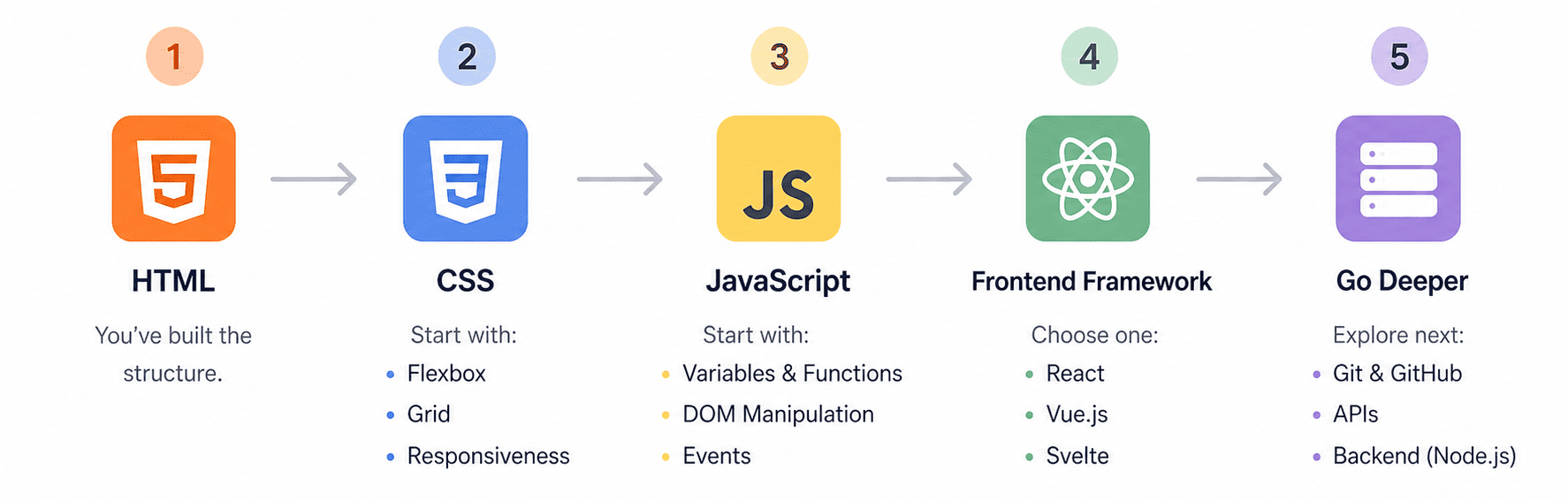
The natural next step is CSS. HTML gives you structure, but CSS turns that structure into something visually meaningful. This is where you learn layouts (Flexbox, Grid), spacing, typography, colors, and responsive design. You start seeing how real websites are built, not just how they are structured. I always recommend combining HTML and CSS at this stage through small projects, because that’s where both skills start to reinforce each other.
After CSS, JavaScript becomes the next major step. This is where your pages become interactive. You move from static content to dynamic behavior: handling clicks, updating content, working with APIs, and creating real user experiences. At this point, your HTML knowledge becomes even more important, because JavaScript interacts directly with the DOM - which is built from your HTML structure.
Once you’re comfortable with JavaScript, you can move into frameworks like React, Vue, or Angular. But here’s the key insight: frameworks don’t replace HTML - they build on top of it. JSX in React, for example, is still fundamentally HTML-like. Developers who understand HTML deeply move through frameworks much faster and write cleaner, more maintainable code. Beyond that, your path can expand into TypeScript, performance optimization, accessibility, and even full-stack development. But everything starts with structure. HTML is not just a starting point - it’s a layer you keep using throughout your entire frontend career.
Common Mistakes in HTML Learning
Over the years, I’ve noticed that most beginners don’t struggle with HTML because it’s difficult - they struggle because they approach it the wrong way. HTML is actually very forgiving, but that can create a false sense of understanding. You can write code that “works” while still building bad habits that will slow you down later when you move into CSS, JavaScript, or frameworks. These early mistakes are subtle, but they compound over time and create unnecessary friction in your learning process.
The key is not just to learn HTML, but to learn it correctly from the beginning. Avoiding common pitfalls will save you weeks - sometimes months - of confusion later. Below are the most common mistakes I’ve seen beginners make, along with practical advice on how to fix them.
-
Learning HTML passively without building anything
One of the biggest mistakes is relying entirely on tutorials without applying what you learn. Watching videos or reading documentation feels productive, but without hands-on practice, the knowledge doesn’t stick. Many beginners can explain tags but struggle to build even a simple page from scratch. This creates a gap between theoretical understanding and real ability. The solution is simple: after every concept, build something - even if it’s small. Turn every lesson into a mini-project. This forces you to think, experiment, and solve problems, which is where real learning happens. -
Memorizing tags instead of understanding structure
Beginners often try to memorize every HTML tag, thinking that knowing more tags means better skills. In reality, HTML is not about memorization - it’s about understanding how elements relate to each other. Without this understanding, code becomes messy and hard to maintain. Instead of memorizing, focus on structure: how sections are organized, how content flows, and how elements nest. Once you understand structure, remembering tags becomes natural because you use them in context. -
Ignoring semantic HTML
Many beginners overuse generic tags like<div>and<span>instead of semantic elements like<header>,<main>,<article>, and<nav>. This might not break the page visually, but it creates problems for accessibility, SEO, and maintainability. Semantic HTML gives meaning to your content, making it easier for browsers, search engines, and assistive technologies to interpret. The fix is to always ask yourself: “What is the purpose of this section?” and choose the appropriate tag accordingly. -
Not validating or reviewing your code
Beginners often write HTML and move on without checking if it’s correct. Missing closing tags, неправильная вложенность, или лишние элементы могут не сразу вызвать ошибки, но со временем создают проблемы. Without validation, bad habits become normal. Use tools like browser DevTools or HTML validators to review your code. This helps you catch mistakes early and understand how the browser interprets your markup. -
Skipping accessibility basics
Accessibility is often seen as an “advanced topic,” but it should be part of learning from the beginning. Ignoring alt attributes, proper labels for forms, or semantic structure leads to poor user experience for many users. More importantly, fixing accessibility later is much harder than doing it correctly from the start. Make accessibility a habit: always add alt text, use labels, and choose semantic tags. This builds better practices early on. -
Jumping to frameworks too early
Many beginners rush into React or other frameworks before fully understanding HTML. This creates confusion because frameworks rely heavily on HTML concepts. Without a solid foundation, everything feels harder than it should be. Developers start copying patterns instead of understanding them. The better approach is to first become comfortable building pages with pure HTML, then gradually introduce CSS and JavaScript. Frameworks will make much more sense when your foundation is strong.
Conclusion
Learning HTML is not just the first step in web development - it’s the step that defines how everything else will feel. If you approach it seriously, focus on structure, and build real projects, you create a foundation that makes CSS, JavaScript, and frameworks much easier to learn. Throughout this guide, I’ve emphasized not just what to learn, but how to learn: through practice, iteration, and understanding, not memorization. This approach is what separates developers who struggle from those who progress confidently.
What matters most is consistency and mindset. HTML itself is not difficult, but mastering it requires attention to detail and a willingness to build things repeatedly. When you combine structured learning, practical projects, and awareness of common mistakes, your progress becomes predictable and steady. From there, the path forward is clear - styling with CSS, adding interactivity with JavaScript, and eventually working with modern frameworks and real-world applications. HTML is not something you “finish” learning - it’s something you continue to use and refine throughout your entire frontend career.
HTML Learning FAQ for Future Frontend Developers
How to Learn HTML and CSS Together Effectively?
The best way to learn HTML and CSS together is to treat them as two connected layers of the same page. HTML defines the structure: headings, sections, forms, links, and content hierarchy. CSS then controls how that structure looks and behaves visually. Start with simple pages using only HTML, then add CSS gradually: spacing, typography, colors, Flexbox, and responsive layouts. Do not learn both only through theory. Build small projects such as a profile page, landing page, or blog layout. This helps you understand how structure and styling work together in real interfaces.
How long should I learn HTML before CSS?
You do not need to spend months on HTML before learning CSS. In most cases, 1-2 weeks of focused HTML practice is enough before introducing basic CSS. The goal is not to memorize every tag, but to understand document structure, headings, links, images, lists, forms, and semantic elements. Once you can build a clean static page, start adding CSS. Learning CSS too late can make HTML feel disconnected from real web design. A practical approach is to learn HTML fundamentals first, then combine HTML and CSS through small projects.
Can I skip HTML and start with frameworks?
Skipping HTML and starting directly with frameworks is a serious mistake. Frameworks like React, Vue, and Angular still produce HTML-like structures in the browser. If you do not understand HTML, you will struggle with component structure, accessibility, forms, SEO, and debugging layout issues. Frameworks can make development faster, but they do not replace fundamentals. A developer who understands HTML deeply writes cleaner components and avoids many beginner mistakes. Learn HTML first, then CSS and JavaScript, and only after that move into frameworks.
Is HTML still relevant in 2026?
Yes, HTML is still highly relevant in 2026. Every website and web application still depends on HTML structure, even when built with modern frameworks, AI tools, or server-rendered platforms. HTML affects accessibility, SEO, page structure, browser rendering, and user experience. Search engines and assistive technologies rely heavily on semantic markup to understand content. Developers who ignore HTML often produce visually working pages that are weak technically. Strong HTML knowledge remains one of the most reliable foundations for frontend development.
How deep should I learn semantic HTML?
You should learn semantic HTML deeply enough to choose elements based on meaning, not appearance. This means understanding when to use <header>,
<main>, <nav>, <section>, <article>, <aside>, and
<footer>. You should also understand labels for forms, alt text for images, heading hierarchy, and landmark structure. You do not need to memorize every
rare tag, but you should know how semantic structure improves accessibility, SEO, and maintainability. Good semantic HTML makes your code easier to read, easier to style,
and easier for users and search engines to understand.
Others Also Read