

How Long Does It Take To Learn Frontend Development?
19 February 2026
569 views
This article is up to date as of October 2026

Written by
Olivia Cook,
React Ecosystem Specialist

Reviewed by
Miles Bennett,
Senior Frontend Architect
One of the most common questions beginners ask is how long does it take to learn frontend. The honest answer depends less on talent and more on structure, consistency, and execution. Frontend development is not just about learning HTML and styling pages. It involves understanding browser behavior, JavaScript logic, responsive design, tooling, and real-world problem solving. The timeline varies significantly depending on how you approach the process.
What changes the timeline:
- More hours per week → faster: full-time or bootcamp-style learning can compress basics into ~4-6 months.
- Prior coding experience → faster: if you already know programming/JS, you can learn React and frontend much quicker.
- Random tutorials and no projects → slower: people who don’t build a focused portfolio often take well over a year.
A focused learner who codes daily and builds structured projects progresses dramatically faster than someone consuming scattered content. Frontend learning rewards discipline. The real determinant is not calendar time but the depth of practice and quality of projects you complete along the way.
What Does It Mean to Learn Frontend Development?
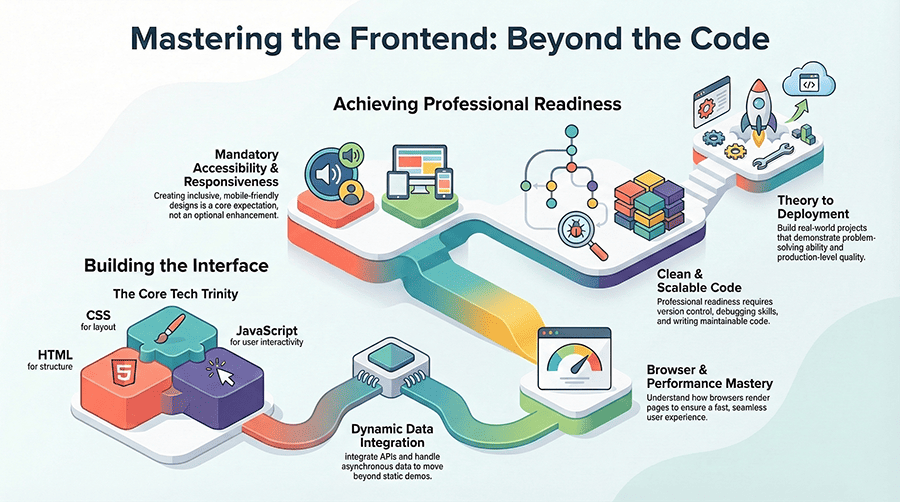
To learn frontend development means mastering the technologies that power the user interface of web applications. It requires understanding how HTML structures content, how CSS controls layout and responsiveness, and how JavaScript creates interactivity. Learning frontend is not limited to memorizing syntax; it involves building functional interfaces that respond to user actions. A developer must understand how browsers render pages and how performance affects user experience. Real frontend competence includes integrating APIs and handling asynchronous data properly. It also involves writing clean, maintainable code that scales beyond small demos. Version control and debugging skills are part of professional readiness. Accessibility and responsive design are considered core expectations, not optional enhancements. Learning frontend development also means building real projects that demonstrate problem-solving ability. Ultimately, it is the transition from theoretical knowledge to deployable, production-level interfaces that defines true learning progress.
What Slows Down Most Beginners When They Learn Frontend Development?
Most beginners do not struggle because frontend is “too hard.” They struggle because their learning process lacks structure, feedback, and measurable output. Frontend development rewards consistent execution: daily coding, debugging, and project delivery. When learners rely on scattered tutorials, they collect information without building competence. That gap becomes obvious the moment they try to create something independently.
Another major slowdown is avoiding hard moments. Debugging a broken layout, understanding why an async request fails, or fixing a state bug in a framework feels uncomfortable. Beginners often escape that discomfort by switching to a new course or “starting over” with a different tutorial series. That habit creates the illusion of progress while blocking real skill growth. Time management also plays a role. Many people “study” frontend for months but code only occasionally. Skills such as JavaScript logic and responsive layout require repetition, not exposure.
Finally, beginners often misunderstand what employers evaluate. Hiring teams do not reward broad topic coverage. They reward depth in fundamentals, evidence of real projects, and the ability to explain technical decisions clearly. If you remove the common bottlenecks below, your learning speed increases sharply and your results become predictable.
Tutorial overload without implementation
Watching content feels productive because it is easy to consume and gives quick wins. The problem is that passive learning does not build the ability to solve problems under real constraints. Beginners who binge tutorials often freeze when asked to build a feature from scratch. They know what code “looks like,” but they do not know how to design and debug it. This slows progress because every new project turns into a search session instead of an engineering process. To fix this, convert every lesson into a build task. After learning Flexbox, build three responsive sections without copying code. After learning async/await, build a small API-driven widget with error handling. Set a rule: for every hour of learning, spend at least two hours coding. Your skill grows when you struggle, not when you watch.
Skipping fundamentals and rushing into frameworks
Frameworks feel like the fastest route to job readiness, but rushing into React or Vue without strong JavaScript fundamentals creates fragile knowledge. Beginners end up memorizing patterns like “useState + useEffect” without understanding why state changes trigger renders or how async flows work. When something breaks, they cannot reason through the issue because they never built the core mental model. A professional path starts with fundamentals: DOM manipulation, event handling, scope, closures, and async behavior. Frameworks become easier when you understand what they abstract. Spending extra time on JavaScript shortens the total timeline because it prevents repeated re-learning later. Strong fundamentals reduce confusion, improve debugging, and make your framework learning stable.
Not building a focused portfolio
Many beginners build random mini-projects that do not form a coherent body of work. They create a calculator, then a weather app, then a landing page, but none of them are polished, deployed, or explained well. This slows progress because projects do not compound into a portfolio that proves employability. Without a focused portfolio, learning remains invisible to employers and even to the learner. Build fewer projects with higher quality. Choose three to five projects that demonstrate core skills: responsive layout, API integration, state management, and clean UI. Deploy them and document decisions. A focused portfolio creates direction, forces completion, and aligns learning with hiring expectations. This approach accelerates job readiness because you build evidence, not just knowledge.
Avoiding debugging and not using DevTools seriously
Debugging is where real engineering skill forms. Beginners often fear breaking things, so they avoid complex tasks or rely on copy-paste fixes. This slows learning because mistakes are the best feedback system. Without debugging practice, errors remain mysterious and progress stays dependent on external answers. Use browser DevTools daily. Inspect layout issues, watch network requests, set breakpoints, and trace runtime errors. Learn to isolate problems systematically: reproduce the issue, narrow variables, validate assumptions, then fix with intent. Each debugging session strengthens your understanding of browsers and JavaScript behavior. Developers who debug confidently learn faster because they are not blocked by errors; they convert errors into learning milestones.
Inconsistent practice and weak time structure
Frontend skills decay quickly without repetition. Many learners study in bursts: three long sessions in one week, then nothing for the next. That pattern prevents skill consolidation, especially in JavaScript and layout building. Inconsistent practice also increases frustration, because each session starts with re-orientation instead of progress. Set a minimum daily coding habit. Even 60 - 90 minutes of focused work daily outperforms occasional marathon sessions. Use weekly goals: one layout build, one JS feature, one small refactor, one deployed update. Consistency creates momentum and improves retention. Over time, your brain starts recognizing patterns faster, and tasks that felt difficult become routine.
No feedback loop or code review
Beginners often learn alone, which makes it hard to identify weaknesses. You can build something that “works” while still writing unmaintainable code, missing accessibility, or relying on brittle patterns. Without feedback, those habits become entrenched and slow your progress later. Employers notice these issues quickly in portfolio reviews and interviews. Create a feedback loop early. Join developer communities, participate in code review channels, or pair program with other learners. Submit pull requests in open-source projects, even small ones. Ask for reviews on architecture, readability, and performance. Feedback compresses the learning timeline because it prevents wasted repetition and corrects issues before they become long-term limitations.
Frontend Learning Roadmap for Beginners
If you want a reliable timeline, you need a sequence that reflects how frontend work happens in real companies. The fastest learners are not the ones who consume the most resources. They are the ones who follow a structured progression and produce visible outcomes at every stage. That’s why roadmaps for frontend developer roles are so effective: they define priorities, remove noise, and ensure each skill builds on the previous one.
The core mistake beginners make is treating frontend as a collection of disconnected topics. In practice, frontend development is a workflow: you structure content (HTML), control layout and responsiveness (CSS), add behavior and data (JavaScript), then scale the UI with a framework and professional tooling. Finally, you prove your capability through projects, deployment, and a portfolio that matches employer expectations. This is the real answer to how to learn frontend web development without getting stuck in endless tutorial loops.
The roadmap below is intentionally compact and outcome-driven. Each direction includes the primary skills to focus on, what “done” looks like, and a realistic learning window in weeks. These time ranges assume consistent practice and daily coding, not passive watching.
| Direction | Recommended Weeks | What to Learn and What “Done” Looks Like |
| Master the Core Trio (HTML, CSS, JavaScript fundamentals) | 6 - 10 weeks | This phase builds the foundation that every frontend role depends on. HTML mastery means semantic structure, accessible forms, and clean document hierarchy that supports SEO and screen readers. CSS mastery means responsive layouts using Flexbox and Grid, a deep understanding of the box model, spacing systems, and predictable styling discipline. JavaScript fundamentals mean strong control of functions, scope, closures, array/object manipulation, DOM events, and asynchronous basics. “Done” means you can build a responsive multi-section page from scratch, implement interactive UI behaviors (modals, tabs, filters, validation), and explain why your code works. You should ship at least two small projects using only vanilla technologies and deploy them publicly. |
| Add a Modern Framework | 4 - 6 weeks | A framework helps you scale UI development by standardizing components, state, and rendering. Choose one (React or Vue) and learn it deeply rather than switching. Focus on component composition, props, state management patterns, routing, forms, conditional rendering, and API integration. “Done” means you can build a single-page application with at least three routes, shared UI components, a real API data flow, and predictable state updates. You should understand why re-renders occur and how to avoid common performance traps such as unnecessary updates. Include one medium project built with your chosen framework, deployed and documented, with clear explanation of architecture and trade-offs. |
| Learn Professional Tools | 2 - 3 weeks | Professional frontend work depends on tooling that enables collaboration and debugging. Learn Git workflows: branching, commits with clear messages, pull requests, conflict resolution, and basic rebasing discipline. Learn browser DevTools for layout inspection, console debugging, network analysis, and performance profiling. Learn package managers and basic build concepts: dependencies, scripts, environment variables, and production builds. “Done” means every project is version-controlled with a clean commit history, you debug issues using DevTools instead of guesswork, and you can deploy reliably. This phase also includes learning how to read errors, trace stack traces, and validate fixes with measurable checks. |
| Polish With Real Projects and Portfolio | 4 - 6 weeks | This stage turns knowledge into employability. The goal is not more projects; the goal is better projects. Build 3 - 5 portfolio-worthy applications that show responsive design, accessibility, API integration, state management, and clean UI patterns. Each project must be deployed and documented with a professional README: problem statement, features, stack, setup instructions, and key decisions. “Done” means you have a portfolio site that loads fast, looks professional, works on mobile, and links to deployed projects and GitHub repositories. Your work should show consistency in naming, structure, and UX quality. This stage is also where you refine code through refactoring, add basic tests where relevant, and prepare your projects for interview-level discussion. |
Best Way to Learn Frontend Development Faster
Speed in frontend learning does not come from shortcuts. It comes from eliminating inefficiency. Many beginners assume that acceleration means cramming more tutorials into their schedule. In reality, the best way to learn frontend development faster is to reduce passive consumption and increase deliberate practice. Progress becomes measurable when learning is structured, output-driven, and feedback-oriented.
Frontend development is a practical discipline. You improve by building interfaces, debugging real issues, and refining code quality. When learning habits reflect how professional developers actually work, growth becomes exponential.
The strategies below are not motivational clichés. They are execution principles used by developers who move from beginner to job-ready within predictable timelines. Each method reinforces long-term competence rather than temporary familiarity. If you apply them consistently, you compress the learning curve without sacrificing depth.
Daily Coding Habit
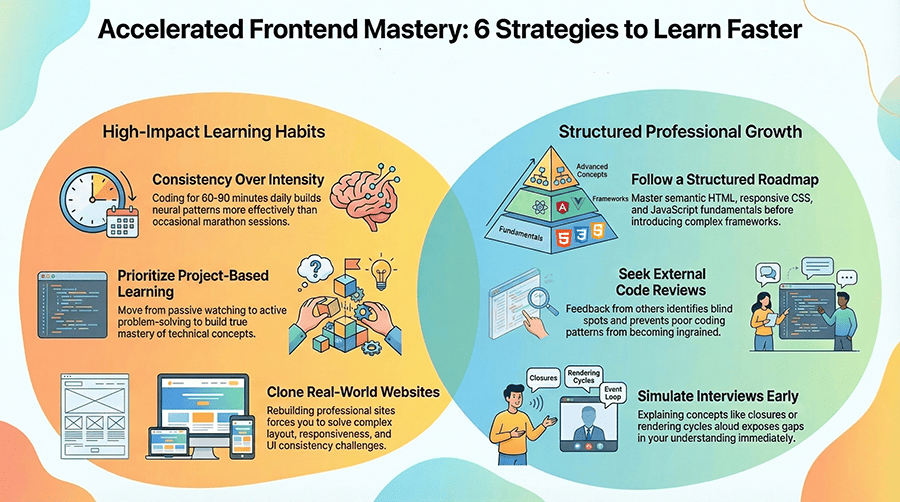
Consistency outperforms intensity. A daily coding habit builds neural patterns that reduce cognitive friction over time. When you code every day, even for 60 - 90 focused minutes, concepts compound. Layout logic becomes intuitive. JavaScript syntax becomes fluid. Debugging becomes systematic instead of stressful.
Turning coding into a non-negotiable routine is one of the most powerful accelerators in frontend learning. Treat it like professional training. Set clear daily objectives: build one layout section, refactor one component, fix one performance issue, or implement one new feature. Avoid vague goals such as “study React today.” Replace them with output-based tasks that result in visible progress. Clear execution targets reduce procrastination and make improvement measurable.
Daily coding also prevents knowledge decay. When practice gaps extend for days or weeks, you spend the next session relearning instead of progressing. Small but consistent sessions maintain momentum and reduce re-orientation time. Track your work visibly. Maintain a GitHub streak, weekly commit goals, or a learning log. Over 30 - 60 days, the cumulative effect becomes obvious. Your confidence increases because repetition transforms uncertainty into competence.
Project-Based Learning Instead of Passive Watching
Passive watching creates recognition, not mastery. You might understand what a hook does in React, but unless you implement it repeatedly, that understanding remains shallow. Project-based learning forces active decision-making, problem-solving, and debugging under real constraints.
Build something slightly beyond your comfort zone. Instead of following step-by-step tutorials, define a project goal first. For example, create a task management app with filtering, API persistence, and responsive layout. Break the application into components and implement each part independently. Struggling through design decisions and debugging challenges develops real engineering skill, not just familiarity with patterns. Struggle is part of the process. When you hit a problem, research selectively. Avoid copying full solutions. Solve incrementally. This strengthens reasoning ability, which employers value more than memorized code.
Projects also expose architectural weaknesses. You begin to see when your folder structure collapses or when state logic becomes confusing. These friction points teach lessons that no tutorial can simulate. Over time, your projects evolve from small demos into structured applications that resemble production environments.
Code Reviews and Feedback
Learning alone creates blind spots. You may write code that functions correctly but violates best practices in structure, readability, or accessibility. Without feedback, those patterns become ingrained and slow future growth. External review shortens the learning curve dramatically.
Expose your code to critique early. Join developer communities, participate in open-source contributions, or exchange reviews with peers. Ask for feedback not only on correctness, but also on structure, naming conventions, maintainability, and scalability. External review identifies weaknesses that are invisible when learning alone and prevents inefficient habits from becoming permanent. When receiving critique, focus on patterns rather than isolated comments. If multiple reviewers mention unclear variable naming or redundant logic, address the root cause systematically. Apply improvements across projects. Reviewing others’ code is equally valuable. Reading different styles and solutions expands architectural awareness. You begin to understand alternative patterns and trade-offs. Over time, this builds technical maturity that separates advanced juniors from beginners. Feedback compresses months of trial-and-error into weeks of directed improvement.
Rebuilding Real Websites
Cloning real-world websites is a powerful acceleration method. It forces you to solve layout complexity, responsive behavior, and UI consistency at a professional level. Unlike isolated exercises, real interfaces contain nested components, reusable patterns, and performance considerations. Choose a SaaS homepage, dashboard, or product page and rebuild it without inspecting the source code. Analyze spacing systems, typography hierarchy, and component structure. Recreate interactions such as dropdowns, navigation menus, and modals using your own logic.
Simulate production-like environments during practice. Rebuilding real websites exposes you to edge cases such as uneven content lengths, complex responsive breakpoints, hover states, and dynamic state changes. These constraints require disciplined CSS structure and thoughtful component architecture. Working under realistic conditions prepares you for professional development far better than isolated exercises. After rebuilding, compare your version with the original. Identify discrepancies and refine. This iterative comparison sharpens attention to detail and UI discipline. Over time, you internalize professional design patterns and layout logic that beginners often overlook.
Structured Roadmap Over Random Resources
Random consumption creates fragmentation. One week you study animations, the next week advanced hooks, without mastering core layout principles. This scattered approach increases total learning time because fundamentals remain unstable. Follow a structured roadmap instead of jumping between random resources. Start with semantic HTML, move to responsive CSS, then strengthen JavaScript fundamentals before introducing a framework. Tooling and deployment should come after core competence is stable. Sequencing topics intentionally prevents gaps in understanding and reduces unnecessary re-learning.
A roadmap ensures sequencing. Each stage reinforces the previous one. You avoid premature complexity and build confidence progressively. Clear milestones also make progress visible. When you complete “Core Trio mastery,” you know exactly what skills you own.
Structure reduces decision fatigue. Instead of constantly asking what to learn next, you execute predefined objectives. This preserves mental energy for coding itself. Learners who follow disciplined roadmaps consistently reach job-ready level faster than those who jump between trends.
Simulating Interview-Style Questions Early
Interview preparation should not start after learning ends. It should run in parallel. Explaining concepts clearly exposes gaps in understanding faster than silent practice. When you attempt to answer a question about closures or rendering cycles aloud, weaknesses become visible immediately. Periodically simulate interview-style questions. Practice explaining how the event loop operates, how React state updates trigger renders, or how you optimized a specific feature in one of your projects. Record yourself if necessary and evaluate clarity. Being able to articulate technical reasoning clearly strengthens understanding and builds confidence for real hiring processes.
Solve small coding challenges under time constraints. Implement array manipulation tasks, debounce functions, or simple UI logic without external help. This strengthens recall speed and confidence. Early exposure to interview-style thinking also shifts your mindset from “learning for myself” to “learning for demonstration.” That shift improves communication skill and forces structured reasoning. When technical understanding and explanation ability develop together, your transition to job applications becomes significantly smoother.
Senior Developer Insights: How to Learn Frontend from Scratch
Conclusion
Learning frontend development is not defined by calendar time alone. The answer to how long does it take to learn frontend depends on structure, consistency, and execution quality. Beginners who follow a clear roadmap, build real projects, and practice daily shorten their timeline significantly. Those who rely on scattered tutorials and avoid practical implementation extend it unnecessarily.
The key takeaway is simple: frontend competence grows through deliberate practice. Master the fundamentals before frameworks. Build projects that demonstrate real capability. Use feedback to refine weaknesses. Simulate real-world constraints rather than ideal conditions.
If you are serious about growth, start with clarity. Define your roadmap, commit to daily coding, and focus on measurable output. Understanding how to learn frontend web development strategically transforms an overwhelming goal into a predictable process. The path is demanding, but it is accessible to anyone willing to approach it with discipline and professional intent.
Frequently Asked Questions (FAQ)
What is the most effective weekly study schedule if I want to learn frontend development from scratch while working a full-time job?
A realistic schedule for beginners who work full-time is built around consistency, not long weekend marathons. The most effective pattern is 60 - 120 minutes of focused coding on weekdays and a longer 3 - 4 hour session once per week for project work. Weekdays should be used for fundamentals: HTML structure, CSS layouts, JavaScript exercises, and debugging practice. The weekly longer block should be used to ship features, refactor code, and deploy updates. This schedule works because it prevents skill decay and keeps your brain in “developer mode” daily. The key is to treat learning as execution: every session ends with output, such as a finished layout section, a working component, or a committed change in Git. Consistency converts limited time into steady progress.
Should I learn HTML and CSS deeply before JavaScript, or learn all three at the same time as a beginner?
The strongest approach is to learn them in parallel but with a controlled sequence. Start with HTML and CSS first to understand structure and layout, then layer JavaScript on top as soon as you can build basic pages. Frontend development is interactive, so delaying JavaScript too long slows real progress. At the same time, beginners who jump into JavaScript without understanding layout fundamentals end up building broken interfaces and blaming logic errors. A practical sequence is: semantic HTML + basic CSS (1 - 2 weeks), responsive layout fundamentals (2 - 3 weeks), then JavaScript fundamentals while continuing to build layouts (ongoing). This approach mirrors real work: you structure UI, style it, then add behavior. Learning all three together makes sense only when you are building projects consistently, not only consuming theory.
Which framework should I learn first for frontend jobs in the U.S., and when should I start learning it?
For most U.S. entry-level roles, React is the most common requirement, but the timing matters more than the brand. You should start a framework after you can build interactive features with vanilla JavaScript: DOM events, form validation, API fetch with async/await, and basic state logic. Starting React too early leads to memorized patterns without real understanding. Once fundamentals are stable, React becomes a productivity tool instead of a confusing abstraction. A strong signal that you are ready is when you can build a small app without a framework and explain why your code works. Then move into React with a project-first approach: routing, forms, API integration, and reusable components. Deep mastery of one framework beats shallow exposure to three.
How many real projects do I need to build before I can confidently apply for junior frontend roles?
Most beginners need three to five polished projects, not ten unfinished demos. “Polished” means deployed, responsive, accessible, and documented with clear READMEs. Employers want to see proof that you can ship complete work, not only experiment. A strong set typically includes: a responsive marketing page with good layout discipline, an API-driven application with loading and error states, and a framework-based single-page app with routing and state management. If you include one project that demonstrates performance awareness or accessibility competence, you stand out immediately. The quality bar is higher than most beginners expect. A project that looks clean but lacks structure or breaks on mobile does not help. Fewer projects with strong execution lead to more interviews than many projects with weak depth.
What is the fastest way to improve JavaScript skills for frontend development without getting stuck on theory?
The fastest improvement comes from building UI features that force real logic under constraints. Instead of solving abstract algorithm problems all day, implement practical frontend tasks repeatedly: form validation, debouncing search input, sorting and filtering lists, pagination, drag-and-drop basics, modal focus management, and API request flows. Each of these features trains core JavaScript fundamentals: events, arrays/objects, state modeling, asynchronous behavior, and error handling. Use DevTools to debug intentionally and learn the event loop through real behavior, not memorization. After building a feature, refactor it for readability and reusability. That cycle - build, debug, refactor - develops professional-level JavaScript far faster than passive learning. When your JavaScript supports real UI behavior confidently, frameworks become easier and interviews become predictable.
Others Also Read
- 15 Most Important Skills for a Frontend Developer in 2026 Most popular
- 12 Best AI Tools for Frontend Development in 2026. My opinion Most popular
- How to Become a Front-End Developer in 2026? Most popular
- Complete Frontend Developer Roadmap for Beginners in 2026 New article
- Frontend Developer Career Path New article
- Common Mistakes Beginners Make When Learning Frontend Development New article